


| System / Method | Shortcut or Code | Notes |
|---|---|---|
| Windows ALT Code | ALT + 8381 | Use numeric keypad with NumLock on |
| Mac Shortcut | Control + Command + Space | Search for “ruble” in Character Viewer |
| Word Shortcut | 20BD then ALT + X | Converts HEX code to UNICODE symbol |
| UNICODE | U+20BD | Official hexadecimal standard |
| HTML Entity | ₽ or ₽ |
Web safe entity references |
Quick Copy and Paste Russian Ruble Symbol
Instant Access
The fastest way to insert the Russian ruble symbol (₽) into text fields, messaging apps, and spreadsheets is utilizing the copy tool above or direct system highlight. The official UNICODE name is RUBLE SIGN, assigned to code point U+20BD (decimal 8381). It consists of a Cyrillic letter Er (Р) intersected by a single horizontal bar, conveying financial stability and standardized pricing.
Proper Typography Spacing
Russian typographic standards dictate specific placement rules for currency notation. The ruble symbol always follows the numerical amount, separated by a non-breaking space rather than standard spacing. For example, write 50₽ or 1,234.56₽. Avoid placing the symbol before the value or separating it with ordinary spaces that might trigger line wrapping between the number and currency sign.
Typing the Ruble Symbol on Windows
Using ALT Codes
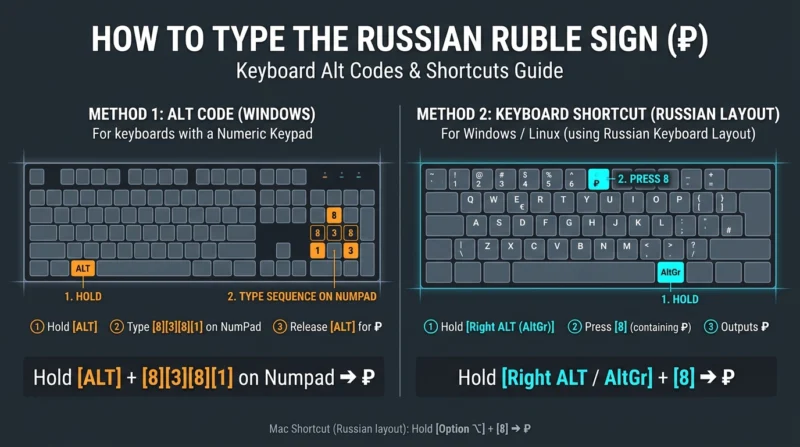
Windows operating systems support direct character input through the numeric keypad. Ensure that NUMPAD is active, press and hold the ALT key, type 8381 on the numeric keypad, and release ALT. Note that legacy codes circulating on forums such as ALT + 0084 or ALT + 1025 are incorrect and will output unrelated characters. Laptops without a dedicated numeric keypad must enable the software NumLock layer or use the Character Map utility.
Microsoft Word ALT + X Shortcut
Productivity applications within Microsoft Office provide a shortcut for hexadecimal UNICODE injection. Open Microsoft Word, Outlook, or PowerPoint, type the hexadecimal sequence 20BD, and immediately press ALT + X. The text string transforms instantly into ₽. Reversing the shortcut by pressing ALT + X while the cursor rests immediately after the symbol reveals its underlying UNICODE value.
Typing the Ruble Symbol on Mac
Using the Character Viewer
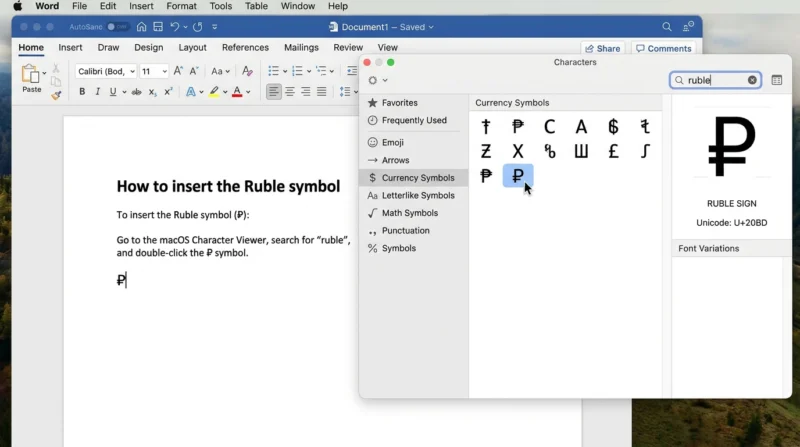
macOS does not feature a dedicated single-key shortcut or Option-key modifier for the ruble sign by default. Access the system-wide character palette by pressing CTRL + CMD + SPACE. Type ruble into the search bar at the top right of the Character Viewer panel. Double-click the resulting ₽ glyph to insert it into the active cursor location.
Alternative Methods
Power users on macOS frequently configure a Text Replacement shortcut to streamline typing. Navigate to System Settings, select Keyboard, open Text Replacements, and assign a shorthand string such as --ruble to automatically substitute into ₽. This bypasses the Character Viewer for frequent documentation tasks.
Using the Ruble Symbol in Web Design and HTML
HTML Entities
Web developers rendering financial values in HTML documents can use character references to ensure cross-browser consistency without relying on raw UTF-8 file encodings. Use the decimal entity ₽ or the hexadecimal entity ₽ directly within markup blocks.
CSS and JavaScript Implementation
Cascading Style Sheets inject currency symbols via pseudo-elements using CSS escape sequences. Apply content: "20BD"; inside a ::before or ::after selector. In JavaScript environments, string declarations accept UNICODE escape notation using "u20BD" for dynamic DOM manipulation and receipt generation.
Frequently Asked Questions
What is the official UNICODE code point for the Russian Ruble symbol?
The official UNICODE code point for the Russian Ruble symbol (₽) is U+20BD, falling under the Currency Symbols block introduced in UNICODE 7.0.
How do I type the ruble symbol in Microsoft Word?
You can type the ruble symbol in Microsoft Word by typing 20BD and immediately pressing ALT + X on your keyboard.
Can I use ALT + 0084 to type the Russian Ruble symbol?
No, ALT + 0084 and ALT + 1025 are incorrect codes. You should use ALT + 8381 on the numeric keypad or native character maps.
Where does the ruble symbol go in relation to the amount?
Standard formatting in Russia places the ruble symbol after the numerical amount, typically separated by a non-breaking space (e.g., 50₽).