


| System / Method | Shortcut or Code | Notes |
|---|---|---|
| Windows ALT Code | ALT + 8709 | Use numeric keypad |
| Mac Shortcut | OPTION + 2205 | Direct key combination or Character Viewer |
| Word Shortcut | 2205 then ALT+X | Instant UNICODE conversion |
| UNICODE | U+2205 | Standard HEX code |
| HTML Entity | ∅ or ∅ | Web safe markup |
Quick Copy and Paste the Empty Set Symbol
Instant Glyph Retrieval
The empty set symbol is frequently required in mathematical notation, set theory, and formal logic. When hardware shortcuts or operating system layout mappings are unavailable, copying and pasting the raw character remains the fastest method for document creation.
Highlight the glyph here: ∅, copy it using CTRL + C on Windows or CMD + C on Mac, and paste it directly into your target application using CTRL + V or CMD + V.
Character Specifications
The empty set glyph is formally defined under specific technical parameters across international standards organizations. Understanding these parameters ensures consistent rendering across fonts and software environments.
- Glyph: ∅
- UNICODE HEX: U+2205
- UNICODE Decimal: 8709
- HTML Decimal Entity: ∅
- HTML HEX Entity: ∅
- Named HTML Entity: ∅
How to Type the Empty Set Symbol on Windows
Using Numeric Keypad ALT Codes
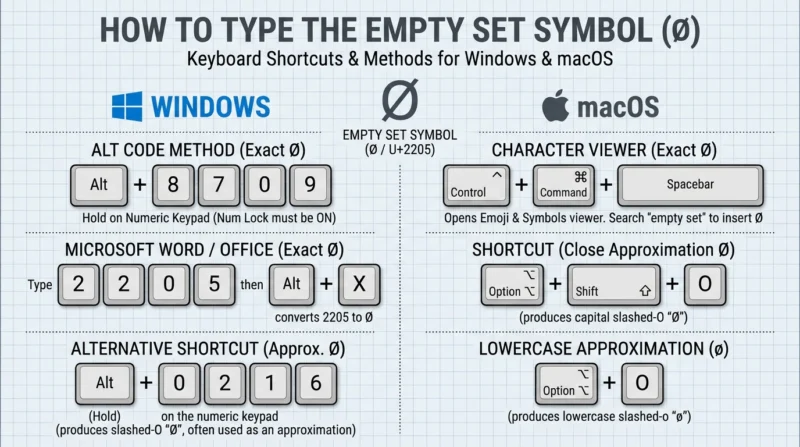
Windows operating systems support direct character input through numeric keypad sequences. This method requires a physical keyboard equipped with an independent numeric keypad section.
- Ensure your NUM LOCK key is active.
- Press and hold down the ALT key.
- Type the decimal code 8709 on the numeric keypad.
- Release the ALT key to render the empty set symbol.
Note that standard top-row number keys do not register correctly for numeric ALT codes. Users operating laptops without dedicated numeric keypads must utilize the Windows On-Screen Keyboard or alternate software shortcuts.
Microsoft Word ALT+X Shortcut
Microsoft Word provides a native text conversion feature that translates hexadecimal UNICODE strings directly into formatted characters without relying on ALT codes.
- Open a Microsoft Word document.
- Type the exact UNICODE HEX value 2205.
- Immediately press ALT + X on your keyboard.
- The text string will automatically transform into the empty set symbol ∅.
This conversion method also operates in reverse. Selecting an existing empty set symbol and pressing ALT + X reveals its underlying hexadecimal code point.
How to Type the Empty Set Symbol on Mac
Using the Character Viewer
macOS manages extended character insertion through the system-wide Character Viewer utility, offering searchable access to the entire UNICODE catalog.
- Press CTRL + CMD + SPACE simultaneously to launch the Character Viewer window.
- Click the search icon in the upper-right corner of the panel.
- Type empty set into the search field.
- Locate the ∅ symbol in the search results and double-click it to insert the character at your current text cursor position.
Option Key Sequence
Direct keyboard entry on macOS can be achieved by utilizing specialized keyboard layouts or the UNICODE HEX Input layout.
- Navigate to System Settings, select Keyboard, and switch your input source to UNICODE HEX Input.
- Press and hold the OPTION key.
- Type 2205 on your keyboard.
- Release the OPTION key to output the empty set symbol.

How to Type the Empty Set Symbol in Web Development and HTML
HTML Entities and Decimal Codes
Web developers embedding mathematical symbols into HTML documents must ensure proper character encoding to prevent rendering errors across browsers. Using named or numeric entities guarantees correct output regardless of the local server encoding configuration.
- Named Entity:
∅renders as ∅ - Decimal Entity:
∅renders as ∅ - Hexadecimal Entity:
∅renders as ∅
CSS and JavaScript References
When generating content dynamically via stylesheets or application logic, specific escape sequences point directly to the empty set code point.
- CSS Content Property: Use
content: "2205";inside pseudo-elements. - JavaScript String Literal: Use
"u2205"within script blocks. - LATEX Mathematical Mode: Use
emptysetorvarnothingdepending on the required visual weight of the glyph.
Frequently Asked Questions
What is the UNICODE code point for the empty set symbol?
The empty set symbol is officially encoded at UNICODE code point U+2205 with a decimal value of 8709.
How do I type the empty set symbol on Windows?
On Windows, hold down the ALT key and type 8709 on your numeric keypad, or type 2205 in Microsoft Word and press ALT + X.
Is the empty set symbol the same as the slashed zero or the Nordic letter Ø?
No, the mathematical empty set symbol (∅) is structurally distinct from the Nordic slashed letter Ø and standard slashed zero glyphs.
What is the HTML entity for the empty set symbol?
The named HTML entity for the empty set symbol is ∅, and its decimal entity is ∅.