


| System / Method | Shortcut or Code | Notes |
|---|---|---|
| Windows ALT Code | ALT + 0128 | Use numeric keypad with Num Lock active |
| Windows Layout | CTRL + ALT + 4 (or AltGr + 4) | Standard international keyboard configurations |
| Mac Shortcut (US) | Option + SHIFT + 2 | Standard Apple US layout |
| Mac Shortcut (UK) | Option + 2 | Standard Apple UK layout |
| Microsoft Word | 20AC then ALT + X | Hexadecimal UNICODE conversion |
| UNICODE | U+20AC | Standard hexadecimal identifier |
| HTML Entity | € or € | Web safe markup references |
Quick Copy and Paste the Euro Symbol
Instant Clipboard Access
When software shortcuts fail or hardware layouts lack dedicated currency keys, copying the symbol directly remains the fastest solution. The primary glyph for the euro currency is € (UNICODE point U+20AC). Utilizing the copy button above transfers the character immediately to your system clipboard, allowing direct insertion into word processors, spreadsheets, email clients, and content management systems.
How to Type the Euro Symbol on Windows
Using Numeric Keypad ALT Codes
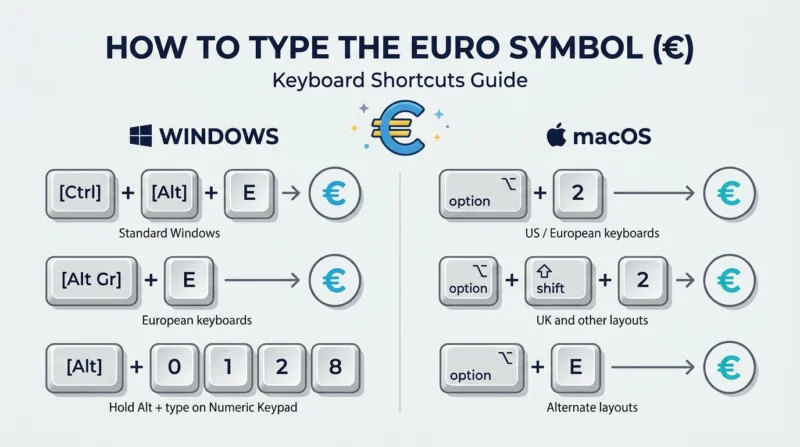
Windows operating systems process legacy character inputs through the physical numeric keypad. To output the euro symbol, ensure Num Lock is toggled on. Hold down the ALT key, type 0, 1, 2, 8 on the dedicated number pad, and release ALT. Note that top-row number keys do not trigger ALT codes; a full-size desktop keyboard or an external numeric pad is required.
For Microsoft Word and Office applications, an alternative hexadecimal method exists. Type the string 20AC directly into your document, then press ALT + X. The four characters transform instantly into the euro glyph.
Using Keyboard Layout Shortcuts
European Windows configurations frequently map the euro sign directly to existing keys. Pressing CTRL + ALT + 4 or AltGr + 4 generates the symbol on standard international and UK extended layouts. German and Spanish regional layouts assign the character to AltGr + E.
How to Type the Euro Symbol on Mac
US Keyboard Layout
Apple macOS partitions keyboard shortcuts according to regional layouts. On a standard Macintosh configured for a US input source, press Option + SHIFT + 2 simultaneously. This combination accesses the third and fourth SHIFT levels of the number row.
UK and European Keyboard Layouts
Mac systems utilizing a British or Irish layout streamline this action to Option + 2. European localizations such as German, French, Italian, and Spanish map the sign to Option + E. Portuguese keyboards utilize Option + 3, while Danish and Norwegian layouts employ Option + 4.
Typing the Euro Symbol on Mobile Devices
iOS and Android Smartphones
Virtual keyboards on mobile operating systems house currency signs within secondary character layers. Switch the software keyboard to its numeric or symbolic view by tapping the 123 or ?#+ key. Locate the standard dollar sign key $, press and hold it until a small floating menu appears, and slide your finger to select the € glyph.
Technical Codes and HTML Entities
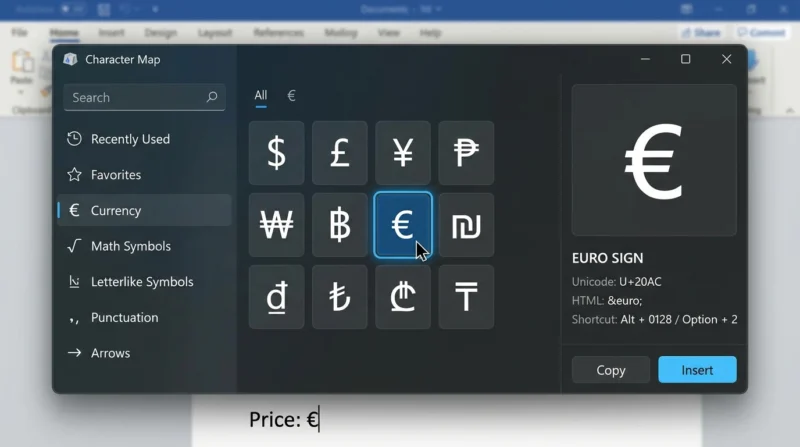
UNICODE and HTML Reference
Web developers and typesetters rely on standardized markup codes to ensure reliable rendering across browsers and operating systems. The euro symbol maps to the following programmatic values:
- UNICODE Hexadecimal:
U+20AC - UNICODE Decimal:
8364 - Named HTML Entity:
€ - Decimal HTML Entity:
€ - Hexadecimal HTML Entity:
€
Troubleshooting Common Typing Failures
Resolving Input Conflicts
When shortcuts fail to output the expected character, investigate common hardware and software conflicts. If numeric keypad ALT codes produce unexpected symbols or fail entirely, verify that Num Lock is active. Laptops lacking physical number pads require the activation of an embedded Fn numeric layer.
If operating system shortcuts fail in specific software environments, third party applications or browser extensions may have hijacked the key combination. Reassigning conflicting hotkeys within system settings or utilizing the operating system character map resolves persistent input blocks.
Frequently Asked Questions
How do I type the euro symbol on a Windows keyboard?
On Windows, you can type the euro symbol (€) by pressing ALT + 0128 on the numeric keypad, or by using the standard layout shortcut CTRL + ALT + 4 or AltGr + 4.
What is the keyboard shortcut for the euro symbol on a Mac?
On a Mac with a US keyboard layout, press Option + SHIFT + 2. On a UK layout, press Option + 2, and on many European layouts, press Option + E.
How can I get the euro symbol on my iPhone or Android phone?
On both iOS and Android, long-press the dollar sign key $ on your software keyboard to reveal a pop-up menu of alternative currency options, then select the euro symbol (€).
What is the UNICODE and HTML code for the euro sign?
The verified UNICODE code point for the euro sign is U+20AC, its decimal code is 8364, and its standard HTML entity is € or €.