


| System / Method | Shortcut or Code | Notes |
|---|---|---|
| Windows Component Codes | ALT + 865, ALT + 248, etc. | Requires individual entry per component |
| Mac Shortcut | Text Replacement | No native single key combo exists |
| Word UNICODE Trick | 0361 then ALT + X | Converts HEX codes to combining marks |
| UNICODE Sequence | U+0028 + U+0361 + U+00B0 + U+035C + U+0296 + U+0361 + U+00B0 + U+0029 | Exact character composition array |
| HTML Entity String | (͡°͜ʖ͡°) |
Web-safe raw markup rendering |
The Anatomy of the Lenny Face
What Characters Make Up ( ͡° ͜ʖ ͡°)?
The standard Lenny face is not a single graphic or an alphanumeric string. It is a compound UNICODE sequence consisting of six distinct symbol types. Because standard keyboards lack dedicated keys for combining diacritics and rare phonetic symbols, typing the face raw requires a multi-step UNICODE composition.
UNICODE Character Breakdown
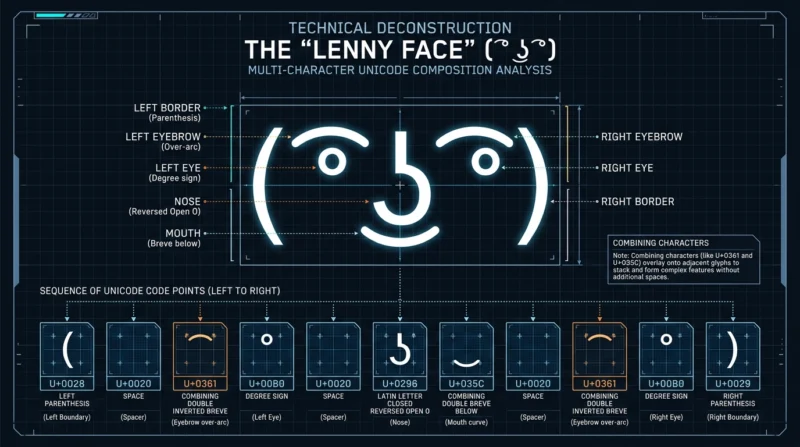
Each component of the face maps to a specific decimal and hexadecimal code point in the UNICODE standard:
(: U+0028 (Decimal 40) – Left Parenthesis͡: U+0361 (Decimal 865) – Combining Double Inverted Breve°: U+00B0 (Decimal 176) – Degree Sign͜: U+035C (Decimal 860) – Combining Double Breve Belowʖ: U+0296 (Decimal 662) – Latin Letter Inverted Glottal Stop): U+0029 (Decimal 41) – Right Parenthesis
Fastest Way to Type or Insert the Lenny Face
Instant Copy and Paste
Due to the complexity of combining multiple UNICODE diacritics into a single expression, the absolute fastest production workflow is copy and paste. Highlight the string ( ͡° ͜ʖ ͡°) from the hero box above, copy it to your clipboard using CTRL + C on Windows or CMD + C on Mac, and paste it using CTRL + V or CMD + V.
Setting Up Custom Text Shortcuts
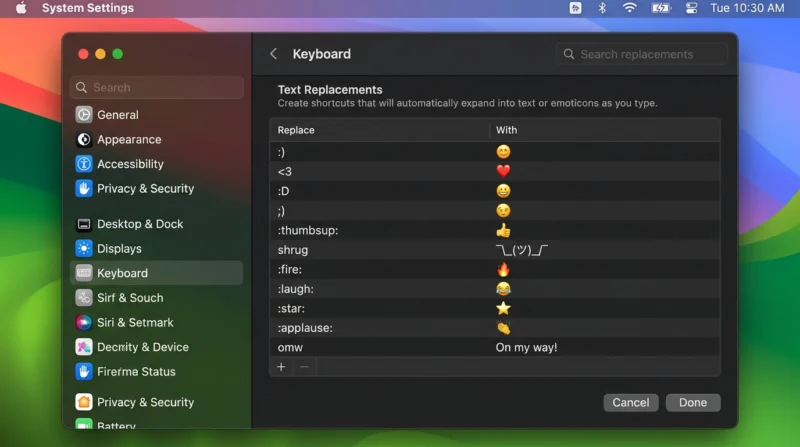
Power users on all operating systems map the Lenny face to a short text replacement trigger. In macOS, navigate to System Settings, select Keyboard, and open Text Replacements. Add a new rule where typing a short string like :lenny: automatically swaps to ( ͡° ͜ʖ ͡°). Mobile operating systems like iOS and Android support identical text shortcut features within their respective keyboard settings menus.
Platform-Specific Input Methods
Windows UNICODE and Component Input
Windows does not feature a single native ALT code for the complete face string because standard input processors cannot parse multi-character diacritic chains under one numeric code. However, individual components can be generated using the numeric keypad by holding ALT and typing the respective decimal code, such as ALT + 0176 for the degree symbol, though this manual building process is significantly slower than text substitution.
Mac and Mobile Workarounds
Apple macOS and iOS default virtual keyboards lack direct keys for combining double inverted breves and inverted glottal stops. Relying on saved clipboard items, third-party text expansion utilities, or native system text replacement macros ensures reliable, error-free output across chat applications, document editors, and browser forms.
Frequently Asked Questions
What is the fastest way to make a Lenny face?
The fastest and most reliable way to make a Lenny face is to copy and paste it directly from a reference site using the string ( ͡° ͜ʖ ͡°).
Is there a single ALT code for the Lenny face?
No, there is no single numeric ALT code for the entire face because it is an assembled sequence of six distinct UNICODE characters rather than a single glyph.
How can I type the Lenny face quickly on a Mac or iPhone?
You can set up a custom Text Replacement shortcut in your system settings so that typing a short trigger phrase automatically inserts ( ͡° ͜ʖ ͡°).
What specific UNICODE characters are used to build the Lenny face?
The face is constructed using standard parentheses, combining double inverted breves (U+0361), degree signs (U+00B0), combining double breves below (U+035C), and the Latin inverted glottal stop (U+0296).