


Understanding the Different Types of O with Accent
The letter o appears across multiple languages with distinct diacritical marks. Selecting the correct glyph depends entirely on the linguistic context, whether Spanish, French, German, Portuguese, or Scandinavian. The primary variations include acute, grave, circumflex, diaeresis or umlaut, tilde, and slash stroke marks.
| Character | Name | UNICODE | Decimal | HTML Entity | Windows ALT Code | Mac Shortcut |
|---|---|---|---|---|---|---|
| ó | o with acute | U+00F3 | 243 | ó |
ALT + 0243 | Option + E, then O |
| ò | o with grave | U+00F2 | 242 | ò |
ALT + 0242 | Option + `, then O |
| ô | o with circumflex | U+00F4 | 244 | ô |
ALT + 0244 | Option + I, then O |
| ö | o with diaeresis | U+00F6 | 246 | ö |
ALT + 0246 | Option + U, then O |
| õ | o with tilde | U+00F5 | 245 | õ |
ALT + 0245 | Option + N, then O |
| ø | o with stroke | U+00F8 | 248 | ø |
ALT + 0248 | Option + O |
Acute, Grave, and Circumflex
Acute (ó) and grave (ò) marks modify vowel sounds and stress patterns in Romance languages like Spanish, Italian, and Catalan. The circumflex (ô) appears frequently in French to indicate historical linguistic shifts.
Umlaut, Tilde, and Stroke
The diaeresis or umlaut (ö) alters vowel quality in German, Hungarian, and Turkish. The tilde (õ) indicates nasalization in Portuguese and Estonian. The slashed variant (ø) functions as a distinct vowel in Danish, Norwegian, and Faroese alphabets.
How to Type O with Accent on Windows
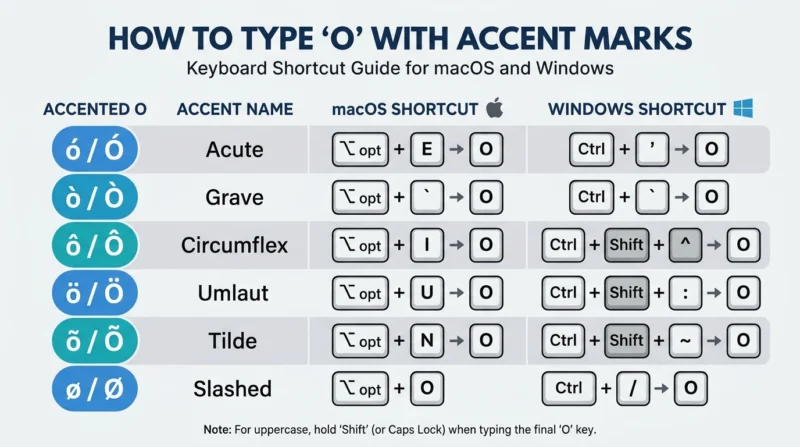
Windows operating systems offer multiple pathways for inserting accented characters, ranging from hardware numeric keypad combinations to software-specific text transformation rules.
Using Numeric ALT Codes
To use numeric ALT codes, ensure your Num Lock key is active. Press and hold the ALT key while typing the exact decimal code on your dedicated NUMPAD. Release the ALT key to render the glyph.
- Lowercase acute (ó): ALT + 0243
- Uppercase acute (Ó): ALT + 0211
- Lowercase umlaut (ö): ALT + 0246
- Uppercase umlaut (Ö): ALT + 0214
Using Microsoft Word HEX and ALT+X Codes
Microsoft Word supports direct UNICODE HEX conversion. Type the four-character hexadecimal code into your document, then press ALT + X immediately after. For instance, typing 00F3 followed by ALT + X instantly transforms into ó.
How to Type O with Accent on Mac
macOS provides streamlined native shortcuts designed around dead keys and press-and-hold menus.
Using Option Key Combinations
Apple keyboards rely on modifier keys acting as dead keys. Press the modifier combination, release, and then press the target letter O.
- Acute: Press Option + E, release, then press O.
- Grave: Press Option + `, release, then press O.
- Circumflex: Press Option + I, release, then press O.
- Diaeresis: Press Option + U, release, then press O.
- Tilde: Press Option + N, release, then press O.
- Stroke: Press Option + O directly.
Using the Character Viewer
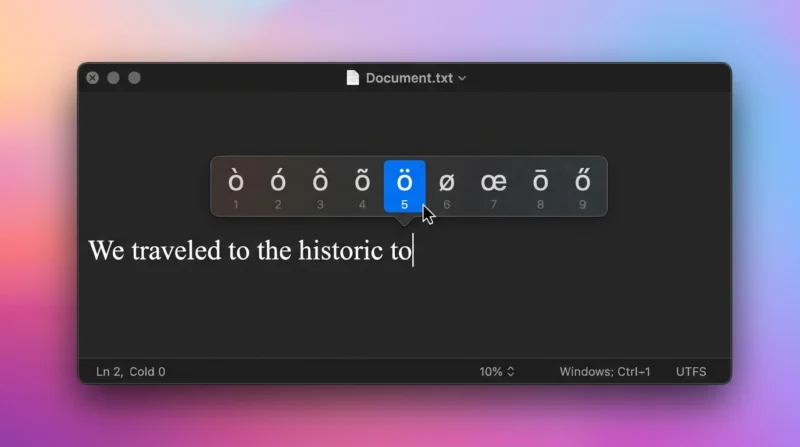
Press Control + Command + Space to launch the Character Viewer palette. Type “o with accent” into the search bar to select and insert any desired glyph.
Typing Accented O on iPhone, iPad, and Android
Mobile touchscreens eliminate complex physical key codes by relying on touch-and-hold gestures.
iOS Press-and-Hold Menu
On an iPhone or iPad virtual keyboard, touch and hold the O key. A floating popup menu appears displaying all available accented variants (ó, ò, ô, ö, õ, ø). Slide your finger to the required character and release.
Android Pop-up Variants
On Android devices using Gboard or Samsung Keyboard, long-press the O key. A secondary selection grid materializes directly above your finger. Drag across to select your exact target accent mark.
Frequently Asked Questions
What is the Windows ALT code for lowercase ó (o with acute)?
The primary numeric ALT code for lowercase ó is ALT + 0243 when using a dedicated numeric keypad with Num Lock enabled.
How do I type an accented o on a Mac?
You can press and hold the O key until a numbered popup menu appears on screen, or use specific dead key combinations such as Option + E followed by O.
How do I type an o with an umlaut (ö) in Microsoft Word?
Type the UNICODE HEX code 00F6 into your document and immediately press ALT + X, or use the numeric ALT code ALT + 0246.
Why aren’t my Windows ALT codes working for accented letters?
Ensure that your Num Lock key is active and that you are utilizing the physical numeric keypad on the right side of your keyboard instead of the standard alphanumeric row at the top.