

- Switch Height: Low-profile switches measure roughly 11mm to 15mm; traditional high-profile switches measure around 18.5mm.
- Key Travel: Low-profile travel distances range from 2.5mm to 3.0mm, while high-profile travel spans 3.5mm to 4.0mm+.
- Ergonomic Impact: Low-profile boards reduce wrist extension, whereas high-profile boards typically require a dedicated wrist rest.
Understanding Keyboard Profiles: Key Travel and Structure
When selecting a mechanical input device, understanding the physical architecture of the hardware is essential for long-term comfort and typing efficiency. Keyboard profiles dictate how your fingers interact with the switches, affecting everything from your words-per-minute speed to the physical strain on your hands and wrists.
What Makes a Keyboard High-Profile?
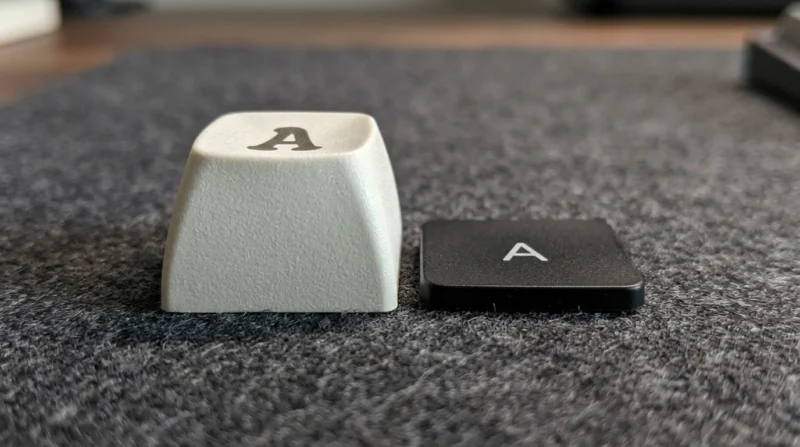
Traditional high-profile mechanical keyboards feature tall cases, deep switch housings, and sculpted keycaps. The case architecture often completely encloses the switch stems, creating a clean desk footprint while elevating the top row of keys significantly above the desk surface. These boards usually incorporate an inherent 6 to 8-degree typing incline.
Because the internal switches must accommodate longer springs and deeper conductive travel, actuation occurs further down the stroke. Typists using CTRL, ALT, and letter keys on high-profile hardware experience a pronounced bottoming-out sensation unless they master precise touch-typing actuation thresholds.
Defining Low-Profile Design
Low-profile keyboards bridge the structural gap between slim laptop chiclet boards and thick desktop mechanical units. They utilize shortened mechanical switches, flat or shallowly sculpted keycaps, and a streamlined chassis that sits flush or very close to the desktop surface.
The switch housings in low-profile designs often use a “floating key” configuration where the switches are exposed above the top plate. This construction reduces the vertical profile, resulting in an overall switch height of 11mm to 15mm compared to the 18.5mm standard of traditional models. Keystrokes register much faster due to the compressed physical travel distance.
Ergonomics, Wrist Angles, and Typing Fatigue
Physical posture during extended typing sessions directly correlates with keyboard profile height. Ergonomic positioning minimizes repetitive strain injuries and keeps hands comfortable during long operational hours.
Wrist Posture and Desk Angle
Low-profile keyboards naturally promote a flatter, more neutral wrist posture. Because the top surface sits lower to the desk, users do not need to bend their wrists upward at an aggressive angle to reach the home row. This reduction in wrist extension decreases tendon friction in the carpal tunnel.
High-profile boards elevate the hands well above the desk plane. Without proper desk alignment, typing on a tall board forces the wrists into an unnatural upward bend. To counteract this, users frequently rely on specific operating system hotkeys like WIN + X or CMD + SPACE to minimize total typing volume when physical fatigue sets in.
Do You Need a Wrist Rest?
Low-profile keyboards rarely require external wrist rests. Their slim vertical rise aligns naturally with standard desktop surfaces and desk mats.
Conversely, high-profile mechanical keyboards almost always benefit from an external wrist rest matching the height of the front lip of the case. Using a wrist rest on a high-profile board keeps the palms supported, preventing the hands from hanging precariously in the air while reaching for modifier keys like SHIFT or CAPS LOCK.
Switch Performance, Sound, and Tactility
Tactile feedback and acoustic output vary dramatically between the two styles due to differences in internal cavity volume and switch stem geometry.
Actuation Speed and Travel Distance
High-profile mechanical switches offer a total travel distance of 3.5mm to 4.0mm, with actuation typically occurring around 2.0mm. This generous travel distance gives typists clear physical feedback, reducing accidental keystrokes.
Low-profile switches reduce total travel to 2.5mm or 3.0mm, with actuation happening as early as 1.0mm to 1.2mm. This snappy response time appeals to fast typists and gamers who prioritize reaction speed over deep tactile feedback.
Acoustic Profiles and Sound Signatures
High-profile cases feature larger internal acoustic chambers beneath the PCB. These empty spaces act as resonators, amplifying switch bottom-out thuds and creating deep, resonant thocks or crisp clicks depending on switch lubrication and plate material.
Low-profile keyboards have minimal internal volume. Consequently, their acoustic signature tends to be sharper, higher-pitched, and quieter, resembling a refined laptop keyboard rather than a hollow mechanical typewriter.
Customization, Maintenance, and Portability
Modifying, cleaning, and transporting your keyboard depends heavily on its profile dimensions and internal component standards.
Keycap and Switch Swapping
High-profile mechanical keyboards enjoy vast aftermarket support. Standards like Cherry MX stem mounts allow users to swap keycaps across hundreds of custom profiles such as OEM, Cherry, SA, and XDA. Hot-swappable PCBs also permit effortless switch replacement using a simple keycap puller.
Low-profile keyboards severely limit aftermarket customization. Due to proprietary stem designs, varying clip placements, and strict vertical tolerances, finding replacement keycaps or alternative switches is difficult. Most low-profile boards require you to use the exact hardware shipped from the factory.
Traveling with Your Keyboard
Low-profile keyboards excel in portability. Their thin form factor, lightweight chassis, and low vertical height allow them to slip easily into backpack laptop sleeves without bulging or risking broken keycap stems.
High-profile keyboards are heavier, thicker, and more vulnerable to physical damage during transit. Transporting a tall mechanical board usually requires a dedicated hard-shell carrying case to protect the exposed keycaps from shearing off.
Frequently Asked Questions
What is the main difference between high-profile and low-profile keyboards?
The primary difference lies in the overall height of the case, switches, and keycaps, resulting in a shorter key travel distance for low-profile boards (around 2.5mm to 3.0mm) compared to traditional high-profile mechanical boards.
Are low-profile keyboards better for ergonomics?
Low-profile keyboards often promote a more natural, flatter wrist posture because they sit closer to the desk surface, which can reduce wrist extension and eliminate the strict need for an external wrist rest.
Can you replace keycaps on a low-profile keyboard?
Keycap replacement is severely limited on low-profile keyboards due to proprietary stem designs and the thin tolerances of the switches, whereas high-profile mechanical keyboards offer vast after-market customizability.
Which keyboard profile is better for fast typing?
Both profiles can achieve fast typing speeds, but low-profile keyboards often favor rapid, lighter keystrokes akin to laptop typing, while high-profile keyboards offer distinct tactile feedback and deeper actuation depth favored by touch typists.