
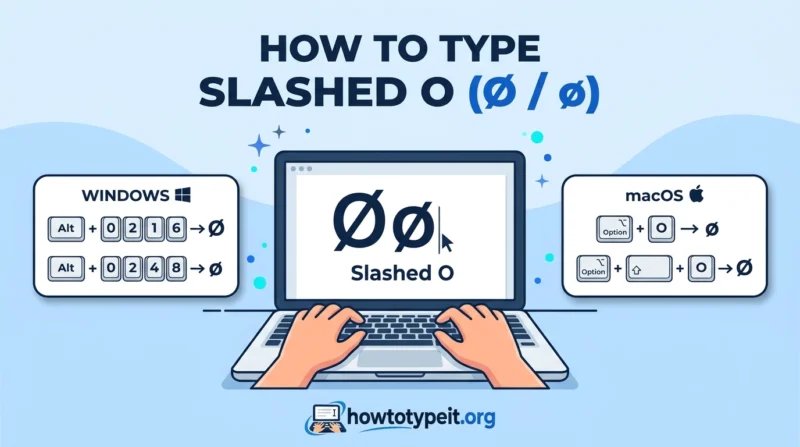

| System / Method | Shortcut or Code | Notes |
|---|---|---|
| Windows ALT Code | ALT + [Code] | Use numeric keypad |
| Mac Shortcut | Option + [Key] | Direct key combination |
| Word Shortcut | [HEX] then ALT+X | Or Insert Symbol |
| UNICODE | U+[HEX] | Standard HEX code |
| HTML Entity | &[name]; or &#…; | Web safe |
Quick Copy and Paste for Slashed O
Immediate Clipboard Access
When you need to insert the slashed O character immediately without dealing with hardware shortcuts or numeric keypad layers, use the reference grid below to copy individual glyphs:
- Uppercase Slashed O:
Ø(UNICODE U+00D8) - Lowercase Slashed O:
ø(UNICODE U+00F8) - HTML Entity Uppercase:
Ø - HTML Entity Lowercase:
ø
How to Type Slashed O on Windows
Using Numeric Keypad ALT Codes
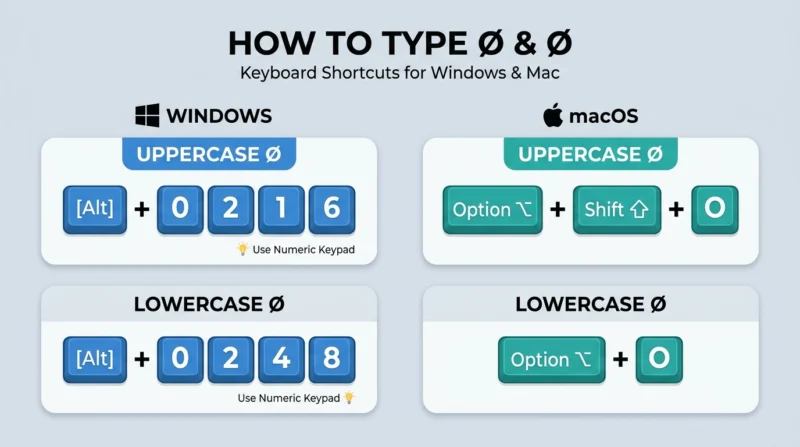
Windows operating systems support direct ASCII and UNICODE insertion via physical numeric keypads. Ensure your NUM LOCK light is active before executing these sequences:
- To output lowercase
ø, press and hold ALT, type 0248 on the numeric keypad, then release ALT. - To output uppercase
Ø, press and hold ALT, type 0216 on the numeric keypad, then release ALT.
Note that laptop keyboards without a dedicated hardware numeric keypad require enabling the embedded software NUMPAD layer via FN keys, or utilizing alternative input methods.
Using Microsoft Word HEX Conversion
Microsoft Word, Outlook, and other Office applications support native hexadecimal code conversion:
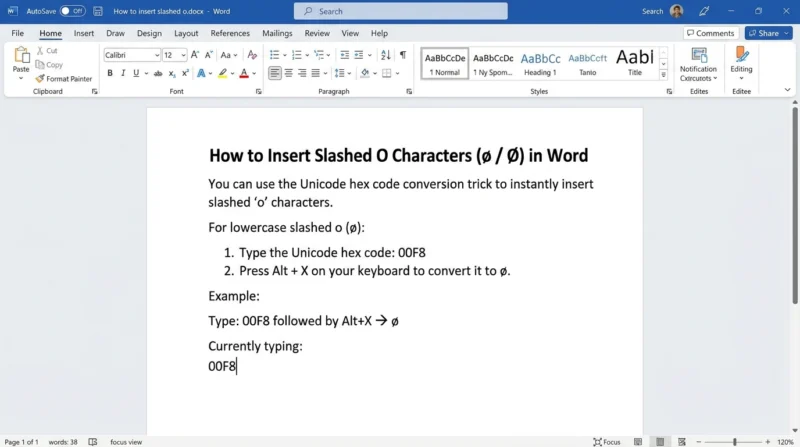
- Type 00F8 directly into your document, then press ALT + X to transform the code into lowercase
ø. - Type 00D8 directly into your document, then press ALT + X to transform the code into uppercase
Ø.
In Excel or Google Sheets, use formula insertion by typing =UNICHAR(248) for lowercase or =UNICHAR(216) for uppercase.
How to Type Slashed O on Mac
Using Apple Keyboard Shortcuts
macOS manages Scandinavian and European accented characters natively through direct key combinations:
- Press OPTION + O simultaneously to generate lowercase
ø. - Press OPTION + SHIFT + O simultaneously to generate uppercase
Ø.
Alternatively, holding down the O key on a standard macOS layout triggers an on-screen character picker bubble displaying indexed number choices for accented variants.
How to Type Slashed O on Linux and Mobile
Linux Compose Key and UNICODE Sequences
Linux environments offer robust input options via universal UNICODE insertion or dedicated compose hardware mapping:
- Press CTRL + SHIFT + U, type 00f8, and press ENTER for lowercase
ø. - Using an assigned Compose key, press COMPOSE, followed by /, then O.
Mobile Phone and Tablet Long-Press Methods
iOS and Android virtual keyboards simplify special character access through gesture inputs:
- Tap and hold the O key on your on-screen software keyboard.
- Slide your finger across to select
øorØfrom the resulting popup menu, then release.
Frequently Asked Questions
What is the fastest way to type the slashed o character?
The fastest method depends on your operating system: use ALT + 0248 on Windows with a numeric keypad, Option + O on a Mac, or simply copy and paste the character directly from a reference guide.
What are the Windows ALT codes for uppercase and lowercase slashed o?
The uppercase slashed O (Ø) is typed with ALT + 0216, and the lowercase slashed o (ø) is typed with ALT + 0248 using your keyboard’s numeric keypad.
How do you type the slashed o in Microsoft Word?
You can type 00D8 and press ALT + X for uppercase Ø, or type 00F8 and press ALT + X for lowercase ø inside Microsoft Word.
Is the slashed O a letter or just an O with a diacritic slash?
The slashed O (Ø/ø) is a distinct vowel letter used in Danish, Norwegian, Faroese, and Southern Sámi alphabets rather than a standard English ‘O’ with a combining slash mark.