


Understanding the Accented N Family
The accented N character set is not a single glyph, but rather a collection of distinct letters used across Spanish, Polish, Czech, Slovak, Welsh, and phonetic alphabets. Each variant combines the base letter N with a specific diacritical mark modify its phonetic value.
| Symbol | Description | Windows ALT Code | Mac Shortcut | UNICODE HEX | HTML Entity |
|---|---|---|---|---|---|
| ñ | Lowercase N with tilde | ALT + 164 | OPT + N, N | U+00F1 | ñ |
| Ñ | Uppercase N with tilde | ALT + 165 | OPT + N, SHIFT + N | U+00D1 | Ñ |
| ń | Lowercase N with acute | ALT + 324 | Character Viewer | U+0144 | ń |
| Ń | Uppercase N with acute | ALT + 323 | Character Viewer | U+0143 | Ń |
| ň | Lowercase N with caron | ALT + 328 | Character Viewer | U+0148 | ň |
| Ň | Uppercase N with caron | ALT + 327 | Character Viewer | U+0147 | Ň |
| ǹ | Lowercase N with grave | ALT + 505 | Character Viewer | U+01F9 | ǹ |
| Ǹ | Uppercase N with grave | ALT + 504 | Character Viewer | U+01F8 | Ǹ |
| ņ | Lowercase N with cedilla | ALT + 326 | Character Viewer | U+0146 | ņ |
| Ņ | Uppercase N with cedilla | ALT + 325 | Character Viewer | U+0145 | Ņ |
Common Variants and Their Uses
The most frequently used character is the Spanish ñ (N with tilde). Other variants like ń appear in Polish orthography, while ň is standard in Czech and Slovak. The cedilla variant ņ is utilized in Livonian and Latvian romanization schemes.
UNICODE and Character Standards
All accented N characters conform strictly to ISO/IEC 10646 and UNICODE specifications. Programmers and web developers can reliably reference these symbols using standard hexadecimal codepoints or named HTML entities.
How to Type Accented N on Windows
Windows provides multiple pathways for inserting accented characters depending on whether your keyboard features a dedicated numeric keypad.
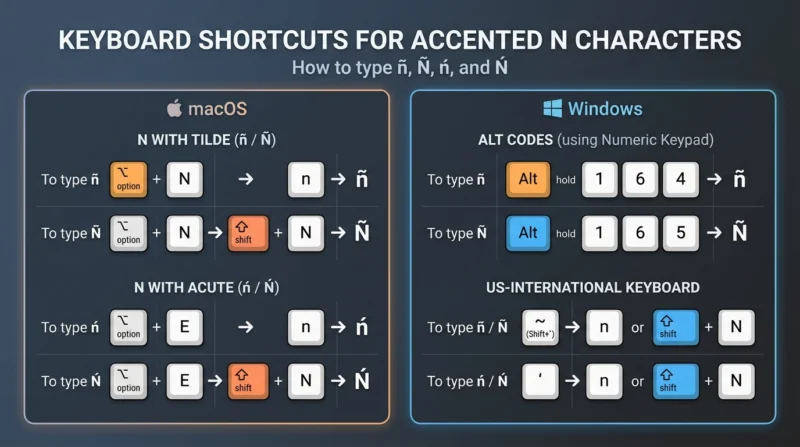
Using Numeric Keypad ALT Codes
To output standard Spanish characters on a desktop keyboard equipped with a NUMPAD:
- Press and hold the ALT key.
- Type 164 on the numeric keypad for lowercase ñ.
- Type 165 on the numeric keypad for uppercase Ñ.
- Release the ALT key.
Microsoft Word UNICODE Shortcuts
In Microsoft Word or Outlook, you can bypass traditional ALT codes by utilizing native UNICODE conversion:
- Type the hexadecimal code 00F1.
- Immediately press ALT + X to convert the code into ñ.
- For other variants, type their respective HEX codes (such as 0144 for ń) followed by ALT + X.
How to Type Accented N on Mac
Apple macOS simplifies international character input through integrated dead-key combinations.
Using Dead-Key Shortcuts
To produce the Spanish ñ or Ñ on a Mac:
- Press OPT + N simultaneously, release both keys (you will see a subtle tilde indicator).
- Press N to output ñ, or SHIFT + N to output Ñ.
The Character Viewer Tool
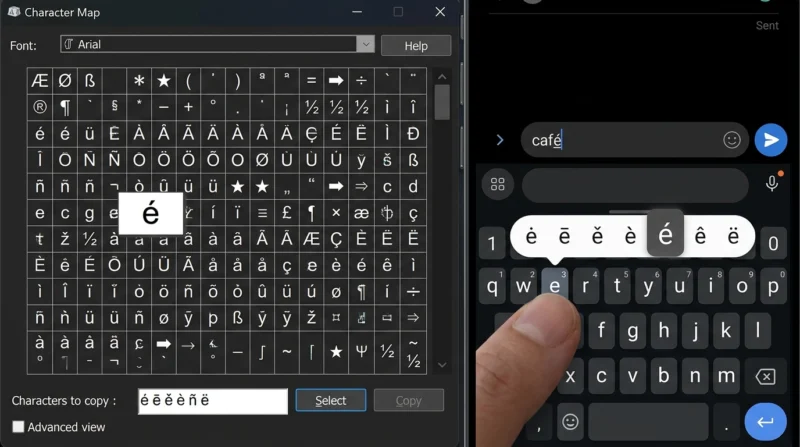
For less common variants such as ň, ǹ, or ņ, press CTRL + CMD + SPACE to open the Character Viewer palette. Type “N” into the search bar to select any specific diacritical variant.
Typing N with Accents on Mobile Devices
Mobile operating systems handle character variations through touch-screen gestures.
iOS and iPadOS Long-Press Menus
On Apple mobile devices, tap and hold the N key on the virtual keyboard. A small popup window will appear displaying all available accented variations (ñ, ń, ň, etc.). Slide your finger to select the required symbol.
Android Virtual Keyboards
Using Gboard or Samsung Keyboard on Android, press and hold the N key until the alternate character selector menu opens. Release your finger over the desired accented glyph.
Frequently Asked Questions
How do I type the lowercase Spanish ñ on a standard Windows keyboard?
You can press and hold the ALT key while typing 164 on the numeric keypad, or use the Microsoft Word shortcut CTRL + SHIFT + ~ followed by N.
What is the fastest way to type ñ on a Mac?
Hold down the OPT key and press N, release both, and then press N again to produce the ñ character.
How do I type accented N characters in Microsoft Word without a numeric keypad?
Type the UNICODE HEX code (such as 00F1 for ñ or 0144 for ń) and immediately press ALT + X to convert it into the accented symbol.
How can I type different variations like ń, ň, or ņ?
You can use their respective UNICODE HEX codes with ALT + X in Word, or rely on your operating system’s character picker utility.