

| System / Method | Shortcut or Code | Notes |
|---|---|---|
| Windows ALT Code | ALT + 0156 / 0140 | Use numeric keypad |
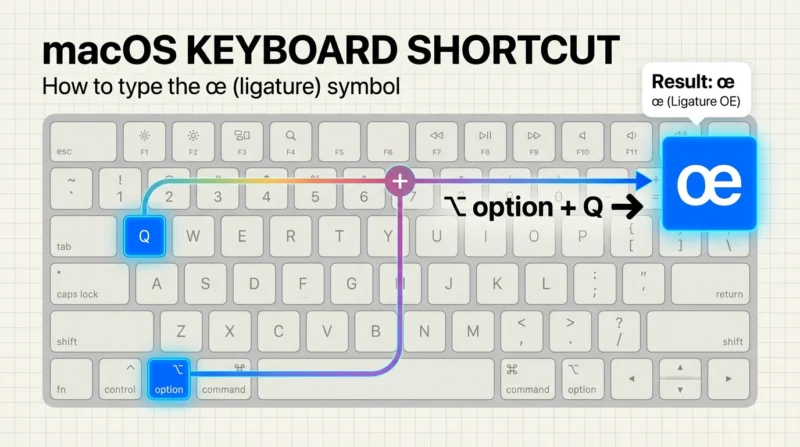
| Mac Shortcut | Option + Q / SHIFT + Option + Q | Direct key combination |
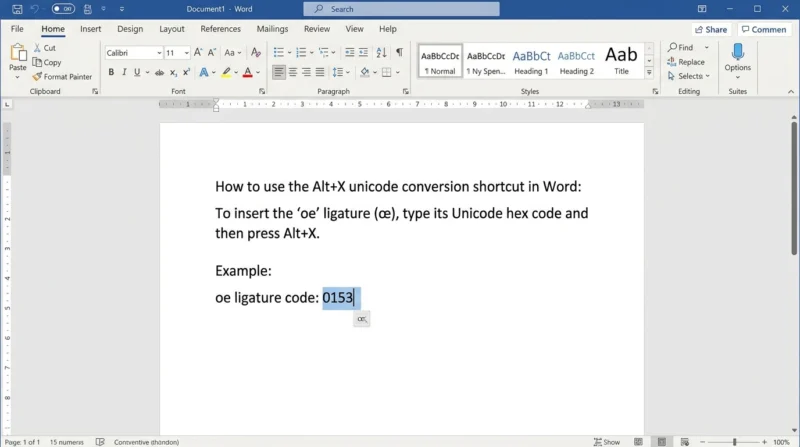
| Word Shortcut | 0153 / 0152 then ALT+X | HEX UNICODE conversion |
| UNICODE | U+0153 / U+0152 | Standard HEX code |
| HTML Entity | œ / Œ | Web safe named reference |
Quick Copy and Paste OE Symbols
Lowercase OE Ligature
The lowercase OE ligature symbol is represented as œ. It appears in French loan words like cœuvre, cœur, and œuvre. Use the copy mechanism above or highlight the symbol here to transfer it directly into your text editor, spreadsheet, or design application.
Uppercase OE Ligature
The uppercase OE ligature symbol is represented as Œ. It appears at the beginning of capitalized French terms or title-case names. Copy the uppercase glyph directly: Œ.
How to Type the OE Symbol on Windows
Using ALT Codes on the Numeric Keypad
Windows operating systems support native character insertion using the numeric keypad. This method requires a full-sized keyboard with an active NUMPAD.
- For lowercase œ: Press and hold ALT, type 0156 on the numeric keypad, then release ALT.
- For uppercase Œ: Press and hold ALT, type 0140 on the numeric keypad, then release ALT.
Ensure that the Num Lock light is active. Using the numbers along the top row of a compact keyboard will not trigger the ALT code sequence.
Using Microsoft Word UNICODE Shortcuts
Microsoft Word provides a rapid hexadecimal-to-UNICODE conversion method:
- Type 0153 and immediately press ALT + X to convert the code to lowercase œ.
- Type 0152 and immediately press ALT + X to convert the code to uppercase Œ.
How to Type the OE Symbol on Mac
Keyboard Shortcut for Lowercase œ
macOS maps international characters directly to primary functional keys. To generate the lowercase OE ligature, press Option + Q simultaneously.
Keyboard Shortcut for Uppercase Œ
To generate the uppercase variant on a Mac, add the SHIFT modifier to the standard key combination. Press SHIFT + Option + Q simultaneously.
Inserting the OE Ligature in Google Docs and Mobile
Special Characters Menu in Google Docs
Google Docs lacks a universal ALT+X text conversion tool. To insert the character within cloud documents:
- Navigate to the top menu and select Insert > Special characters.
- In the search field, type “oe ligature” or draw the glyph in the drawing pad area.
- Click the matching result to drop it into your document.
Using Touchscreen Keyboards on iOS and Android
Mobile virtual keyboards handle extended Latin characters natively through press-and-hold gestures:
- iOS (iPhone/iPad): Tap and hold the O key on the standard software keyboard until a selection pop-up appears, then slide to select œ or Œ.
- Android: Long-press the O key on supported keyboards to reveal character variants. If your default layout lacks the ligature, use the emoji and symbol panel or copy and paste the glyph directly.
HTML Entities for Web Developers
Named and Numeric Entity References
When writing markup for web pages, raw UNICODE characters can sometimes cause encoding mismatches. Use standard HTML entities to render the OE symbol reliably across all browsers:
- Lowercase Named Entity: œ renders as œ
- Uppercase Named Entity: Œ renders as Œ
- Lowercase Decimal Entity: œ renders as œ
- Uppercase Decimal Entity: Œ renders as Œ
- Lowercase HEX Entity: œ renders as œ
- Uppercase HEX Entity: Œ renders as Œ
Frequently Asked Questions
What is the ALT code for the lowercase OE symbol (œ)?
The Windows ALT code for the lowercase œ symbol is ALT + 0156 using the numeric keypad.
How do you type the OE symbol on a Mac?
You can type the lowercase œ symbol on a Mac by pressing Option + Q, and the uppercase Œ by pressing SHIFT + Option + Q.
What is the UNICODE code point for the OE ligature?
The UNICODE code point for the lowercase œ is U+0153, and for the uppercase Œ it is U+0152.
How do you insert the OE symbol in Google Docs?
You can insert the OE symbol in Google Docs by going to Insert > Special characters and searching for “oe ligature”.