

| Symbol | Name | Windows ALT Code | Mac Shortcut | UNICODE HEX | HTML Entity |
|---|---|---|---|---|---|
| < | Less-than sign | ALT + 60 | Direct key (SHIFT + ,) | U+003C | < |
| > | Greater-than sign | ALT + 62 | Direct key (SHIFT + .) | U+003E | > |
| ≤ | Less-than or equal to | ALT + 243 | OPT + < | U+2264 | ≤ |
| ≥ | Greater-than or equal to | ALT + 242 | OPT + > | U+2265 | ≥ |
Understanding the Comparison and Inequality Symbols
The Standard Less-Than (<) and Greater-Than (>) Marks
The standard less-than sign (<) and greater-than sign (>) serve as primary comparison operators across natural language formatting, mathematics, and computer programming. In programming languages such as HTML, XML, and C++, these characters frame structural syntax tags or evaluate conditional logic statements. Because of this dual utility in text documents and codebases, physical keyboards dedicate primary keys to these glyphs.
Mathematical Inequality Variants (≤ and ≥)
When numeric comparisons require inclusive boundaries, standard ASCII characters are replaced by distinct mathematical symbols: the less-than-or-equal-to sign (≤) and the greater-than-or-equal-to sign (≥). These composite characters merge a horizontal inequality baseline with a lower bounding line. They lack dedicated single-action physical keys on standard 101-key US QWERTY boards, requiring alternative keystroke sequences, operating system character maps, or macro tools.
How to Type Less-Than and Greater-Than on Standard Keyboards
Direct Keyboard Entry on Windows and Mac
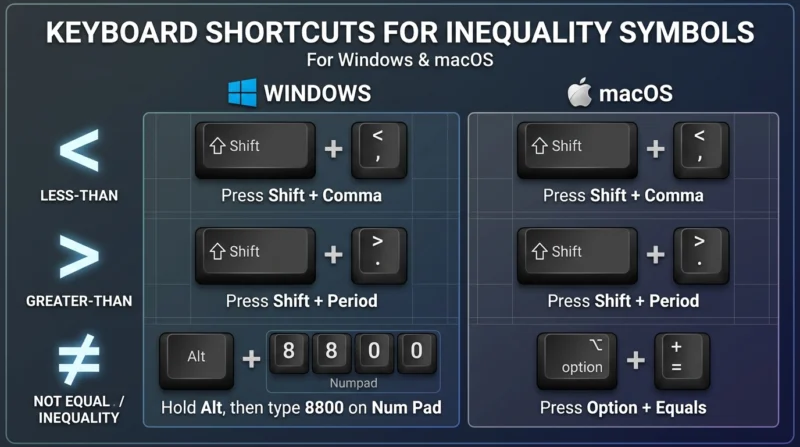
On standard QWERTY keyboards, the less-than and greater-than characters occupy the comma and period keys. To output these characters, hold down the SHIFT key and press the comma key (,) to generate <, or press the period key (.) to generate >.
Windows / Mac Direct Entry:
[SHIFT] + [,] –> >
Using Windows ALT Codes
When physical modifier keys fail or when utilizing keyboards without standard punctuation mapping, Windows systems accept numeric keypad codes. Ensure NUM LOCK is active, press and hold the ALT key, and enter the decimal code on the numeric pad.
- Type ALT + 60 on the NUMPAD to output <.
- Type ALT + 62 on the NUMPAD to output >.
Typing Mathematical Inequality Symbols (≤ and ≥)
Mac Option Key Combinations
macOS streamlines mathematical inequality typing through the OPT (Option) key modifier. By combining the modifier with standard punctuation keys, users generate compound inequality glyphs instantly without opening character viewers.
- Press OPT + , to output ≤.
- Press OPT + . to output ≥.
Windows Numeric Keypad ALT Codes
Windows relies on decimal ASCII values entered via the dedicated numeric keypad to generate strict inequality symbols.
- Press and hold ALT + 243 on the NUMPAD, then release ALT to output ≤.
- Press and hold ALT + 242 on the NUMPAD, then release ALT to output ≥.
Alternative Methods in Word and Google Docs
Microsoft Word ALT + X HEX Conversion
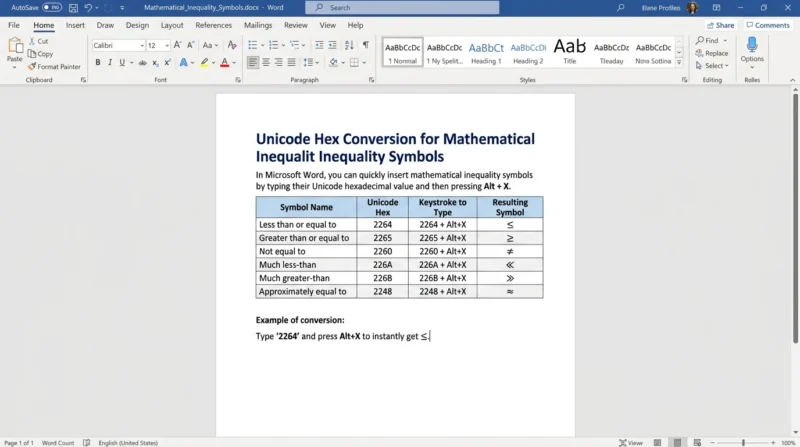
Microsoft Word supports native UNICODE hexadecimal conversion within document bodies. Type the hexadecimal code directly into the text editor, then immediately press ALT + X to transform the string into its corresponding graphical character.
- Type 003C followed by ALT + X to produce <.
- Type 003E followed by ALT + X to produce >.
- Type 2264 followed by ALT + X to produce ≤.
- Type 2265 followed by ALT + X to produce ≥.
Excel Formula Generation:
=CHAR(60) –> >
=UNICHAR(8804) -> ≤
=UNICHAR(8805) -> ≥
Inserting Symbols via Menus
For software lacking native HEX shortcuts, menus provide reliable entry methods. In Microsoft Word or Google Docs, navigate to the top ribbon, select Insert, choose Special Characters or Symbol, and search for the target inequality glyph within mathematical operator sets.
Frequently Asked Questions
How do I type the less than (<) and greater than (>) symbols?
On standard QWERTY keyboards, hold down the SHIFT key and press the comma key (,) for < or the period key (.) for >.
What is the ALT code for the less than or equal to symbol (≤)?
On Windows, ensure NUM LOCK is active, hold down the ALT key, and type 243 on the numeric keypad.
How do I type less-than-or-equal-to (≤) on a Mac?
Hold down the OPT key and press the comma key (,), which corresponds to the less-than base key.
How can I insert these symbols in Microsoft Word without a number pad?
Type the UNICODE hexadecimal code (such as 003C for <) and immediately press ALT + X to convert it.