


| System / Method | Shortcut or Code | Notes |
|---|---|---|
| Windows ALT Code | ALT + 128148 | Use numeric keypad |
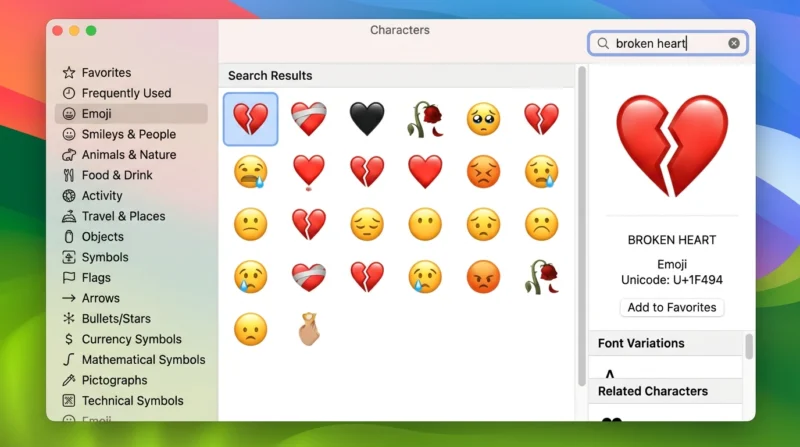
| Mac Shortcut | CTRL + CMD + Space | Opens Character Viewer |
| Word Shortcut | 1F494 then ALT+X | Instant UNICODE conversion |
| UNICODE | U+1F494 | Standard HEX code |
| HTML Entity | 💔 or 💔 |
Web safe encoding |
Quick Copy and Paste the Broken Heart Symbol
Instant Clipboard Access
The fastest method to use the broken heart symbol in documents, chat applications, or social media posts is utilizing the copy button above. This instantly loads the character into your local clipboard buffer. Alternatively, highlight the symbol (💔) directly with your cursor, copy it using CTRL + C on Windows or CMD + C on macOS, and paste it into any text field.
Typing the Broken Heart Symbol on Windows
Microsoft Word ALT+X Method

Microsoft Word provides the most reliable native text conversion utility for high-value UNICODE characters. Open any Word document and execute the following sequence:
- Type the hexadecimal code 1F494 directly into the text editor.
- Immediately press ALT + X.
- The alphanumeric string instantly transforms into the broken heart symbol 💔.
Reversing the process by pressing ALT + X while your cursor is immediately after the symbol reveals its underlying hexadecimal code point.
Using Windows ALT Codes
For applications outside Microsoft Word, use the numerical keypad to generate the character. Ensure that Num Lock is active, hold down the ALT key, type 128148 on your numeric keypad, and release ALT. Note that this requires a physical full-size keyboard equipped with a dedicated numerical pad.
Inserting the Symbol on macOS and Google Docs
Mac Character Viewer
macOS handles modern emoji and symbols through a unified character picker. Access this panel by pressing CTRL + CMD + Space simultaneously. Type broken heart into the search bar at the top of the utility window, locate 💔 in the grid, and press Enter to insert it at your cursor location.
Google Docs Special Characters
Web-based editors like Google Docs manage symbols independently of the underlying operating system. Navigate to the top menu bar, select Insert, choose Special characters, and type broken heart in the search field to select and insert the glyph.
Using the Mobile Devices
iOS and Android Emoji Keyboards
Standard mobile environments on iPhone, iPad, and Android handle the broken heart symbol natively through their built-in virtual keyboards. Tap the emoji icon (smiley face or globe key), type broken heart into the emoji search bar, or browse the symbols category to select 💔.
Technical Specifications and UNICODE Details
UNICODE Metadata
The broken heart symbol is formally registered in the UNICODE Standard under the Basic Multilingual Plane or supplementary planes with strict technical identifiers:
- UNICODE Name: BROKEN HEART
- Code Point: U+1F494
- Decimal Value: 128148
- Hexadecimal UTF-8: F0 92 92 94
HTML Entities
Web developers incorporating the symbol directly into raw HTML source code should use standard entity structures to prevent character encoding degradation:
- Decimal HTML Entity:
💔 - Hexadecimal HTML Entity:
💔 - CSS Escape Format:
1F494
Frequently Asked Questions
How do I type the broken heart symbol on Windows?
You can type the broken heart symbol in Microsoft Word by typing 1F494 and pressing ALT + X, or by using the decimal ALT code ALT + 128148 on your numerical keypad.
What is the UNICODE value for the broken heart symbol?
The official UNICODE code point for the broken heart symbol (💔) is U+1F494.
Can I type a broken heart symbol on a Mac without an emoji picker?
There is no direct Option-key shortcut for the broken heart symbol on macOS, but you can quickly access it by pressing CTRL + CMD + Space to open the Character Viewer.
What is the HTML entity for the broken heart symbol?
The HTML decimal entity for the broken heart symbol is 💔 and the hexadecimal entity is 💔.