


| System / Method | Shortcut or Code | Notes |
|---|---|---|
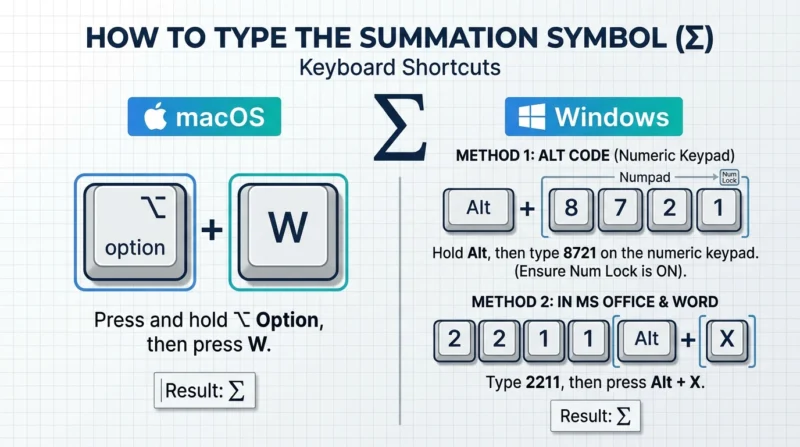
| Windows ALT Code | ALT + 8721 | Requires NUMPAD (Word/UNICODE apps) |
| Mac Shortcut | Option + W | Native macOS text layout shortcut |
| Word Shortcut | 2211 then ALT+X | Converts HEX directly to math operator |
| UNICODE | U+2211 | Standard hexadecimal designation |
| HTML Entity | ∑ | Standard web encoding entity |
Quick Copy and Paste Summation Symbol
Immediate Character Access
When preparing documents, mathematical equations, or financial models, speed is essential. Copying the character directly from the hero box above bypasses configuration constraints across operating systems. The summation operator represents an n-ary summation in mathematics, combining sequences of values efficiently.
Understanding UNICODE and HTML Entities
Technical writing requires precise character identification. The mathematical summation operator uses UNICODE designation U+2211 with a decimal value of 8721. Web designers use the HTML entity ∑ or numerical reference ∑ to render the symbol across browsers without font degradation.
How to Type Summation Symbol on Mac
Using the Option Key Shortcut
macOS supports native keyboard combinations for character generation. Pressing Option + W simultaneously generates the summation symbol (∑) in standard text fields, word processors, and design software.
Searching via Character Viewer
For users unfamiliar with the direct shortcut, macOS includes an integrated character database. Open the viewer by pressing Control + Command + Space, type summation into the search field, and double-click the matching symbol to insert it into the active cursor position.
How to Type Summation Symbol on Windows
Using UNICODE HEX Conversion in Word
Windows environments lack a single universal keystroke for math symbols outside specialized software, but Microsoft applications offer a built-in HEX-to-character utility. Type 2211 in a document, then press ALT + X to convert the numeric string into the summation symbol (∑).
Distinguishing Summation from Greek Sigma
Users must avoid confusing the mathematical summation operator (∑, U+2211) with the Greek capital letter sigma (Σ, U+03A3). While visually similar, they function differently in typesetting and programmatic data parsing. Standard numeric keypad codes targeting older ASCII layouts produce the Greek letter rather than the mathematical operator.
Inserting Summation in Office and Google Workspace
Microsoft Word Equation Tools
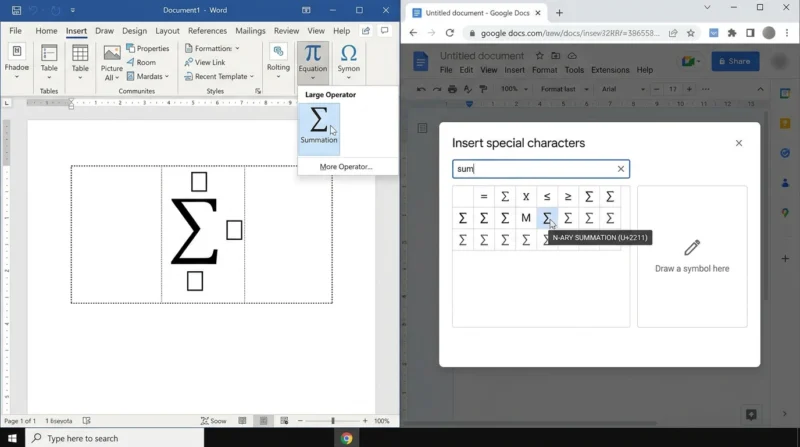
Advanced document production utilizes the dedicated equation framework. Pressing ALT + = opens an equation block. Inside this block, typing sum followed by the Spacebar instantly transforms the text into a fully formatted summation structure equipped with upper and lower limit placeholders.
Google Docs Special Characters Menu
Cloud-based document editors handle symbols through dedicated menus. Navigate to the top menu bar, select Insert, choose Special characters, and search for summation. Clicking the resulting ∑ glyph places it directly into the document canvas.
Frequently Asked Questions
What is the keyboard shortcut for the summation symbol on Mac?
On macOS, press Option + W to quickly insert the summation symbol (∑).
How do you type the summation symbol in Microsoft Word?
Type 2211 and press ALT + X in Word, or press ALT + = to open the equation editor and type sum.
Is the summation symbol the same as the Greek letter sigma?
No, the mathematical operator (∑, U+2211) is distinct from the Greek capital letter sigma (Σ, U+03A3), though they share a similar visual heritage.
What is the HTML entity for the summation symbol?
The HTML entity for the summation symbol is ∑ and its UNICODE decimal code is 8721.