

| System / Method | Shortcut or Code | Notes |
|---|---|---|
| Windows ALT Code | ALT + 8745 | Use numeric keypad |
| Mac Shortcut | Character Viewer | Open via CTRL+CMD+SPACE |
| Word Shortcut | 2229 then ALT+X | Converts UNICODE HEX instantly |
| UNICODE | U+2229 | Standard hexadecimal designation |
| HTML Entity | ∩ or ∩ |
Web and markup safe |
Quick Copy and Paste Intersection Symbol
Standard Intersection Symbol (∩)
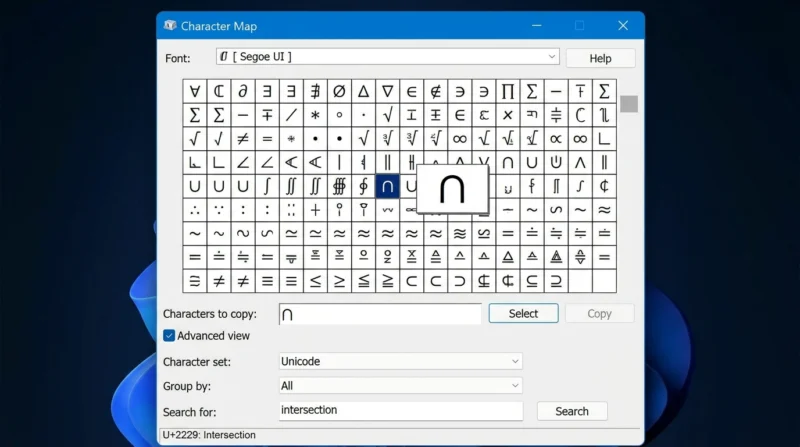
The standard intersection symbol is represented by UNICODE code point U+2229. It is widely applied in set theory to denote the common elements shared between two or more sets. When keyboard shortcuts are unavailable, the most direct method is selecting and copying the symbol directly from reference tables.
N-Ary Intersection Symbol (⋂)
For advanced mathematical notation involving indexed families of sets or multiple set intersections, use the larger n-ary intersection operator. Its UNICODE designation is U+22C2. Copy it directly here: ⋂.
How to Type the Intersection Symbol on Windows
Using Numeric Keypad ALT Codes
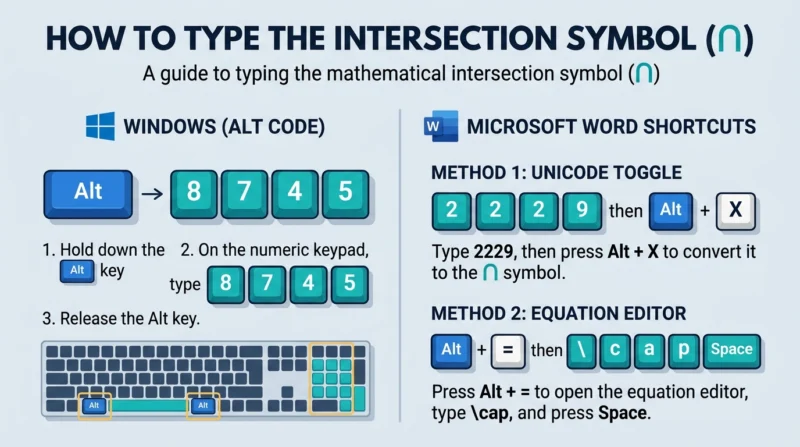
Windows users can generate characters directly through decimal ASCII and UNICODE values assigned to the numeric keypad.
- Ensure the NUM LOCK key is active on your physical numeric keypad.
- Press and hold the ALT key.
- Type the decimal sequence 8745 on the numeric keypad.
- Release the ALT key, and the intersection symbol (∩) will render at the cursor position.
Using Microsoft Word UNICODE Conversion
Microsoft Office applications support a rapid HEX-to-UNICODE conversion sequence without requiring keypad codes.
- Open any Microsoft Word document or Outlook email field.
- Type the exact hexadecimal code 2229 directly into your document.
- Immediately press ALT + X on your keyboard.
- The text string transforms instantly into the intersection symbol (∩). Pressing ALT + X a second time converts it back to its raw UNICODE HEX representation.
Typing on Mac and Other Operating Systems
Using the Mac Character Viewer
Apple macOS lacks a dedicated single-key shortcut for the mathematical intersection symbol. System-wide character insertion relies on the built-in character viewer utility.
- Place your text cursor inside the target application text field.
- Press CTRL + CMD + SPACE to launch the Character Viewer popup window.
- Type intersection into the search bar at the top right of the viewer.
- Double-click the ∩ glyph within the math symbols section to insert it into your document.
Google Docs and Web Applications
Cloud editing environments like Google Docs require specialized insertion tools because they do not process native operating system ALT codes.
- Navigate to the top menu bar in Google Docs.
- Select Insert, click Special characters, and open the search menu.
- Type intersection into the search field, or draw the symbol in the canvas pad area.
- Click the ∩ result to inject it into the active cursor location.
HTML, CSS, and LATEX Markup Codes
HTML Entities and Decimal Codes
Web developers render mathematical operators reliably across different web browsers by using designated HTML entities and numerical entities.
- Named Entity:
∩renders as ∩. - Decimal Entity:
∩renders as ∩. - Hexadecimal Entity:
∩renders as ∩. - CSS Content Property:
content: "2229";inserts the character via CSS pseudo-elements.
LATEX and TeX Commands
Academic publishing platforms, technical documentation tools, and Markdown math engines utilize TeX commands for equations.
- Standard Intersection: Use the command
capto render a standard intersection symbol. - Large N-Ary Intersection: Use the command
bigcapto produce an indexed or large-scale intersection operator.
Frequently Asked Questions
What is the ALT code for the intersection symbol?
The standard Windows ALT code for the intersection symbol (∩) is ALT + 8745 when using an extended numeric keypad.
How do I type the intersection symbol in Microsoft Word?
In Microsoft Word, type 2229 and then immediately press ALT + X to convert the code into the intersection symbol.
What is the HTML entity for the intersection symbol?
The named HTML entity for the intersection symbol is ∩, and its decimal numeric equivalent is ∩.
How do I write the intersection symbol in LATEX?
In LATEX, you can produce the standard intersection symbol by typing cap, while the larger indexed form requires the bigcap command.