


| System / Method | Shortcut or Code | Notes |
|---|---|---|
| Windows ALT Code | ALT + 9774 | Use numeric keypad with NumLock active |
| Mac Shortcut | Control + Command + Space | Open Character Viewer and search “peace” |
| Word Shortcut | 262E then ALT + X | Converts HEX text directly into the glyph |
| UNICODE | U+262E | Standard hexadecimal designation |
| HTML Entity | ☮ or ☮ | Web-safe markup representation |
Quick Copy and Paste
Instant Glyph Retrieval
The fastest way to insert the peace symbol (☮) into documents, chat windows, or code editors is to copy it directly from a reference page. Highlight the symbol, press CTRL + C (or CMD + C on macOS), and paste it into your destination using CTRL + V or CMD + V.
Where to Use the Peace Symbol
The peace symbol finds extensive application in social media profiles, digital messaging platforms, graphic design layouts, and HTML documentation. Because it is an official UNICODE character (U+262E), it is universally recognized across modern operating systems, web browsers, and mobile fonts without requiring specialized third-party font packs.
Typing the Peace Symbol on Windows
Using the Numeric Keypad ALT Code
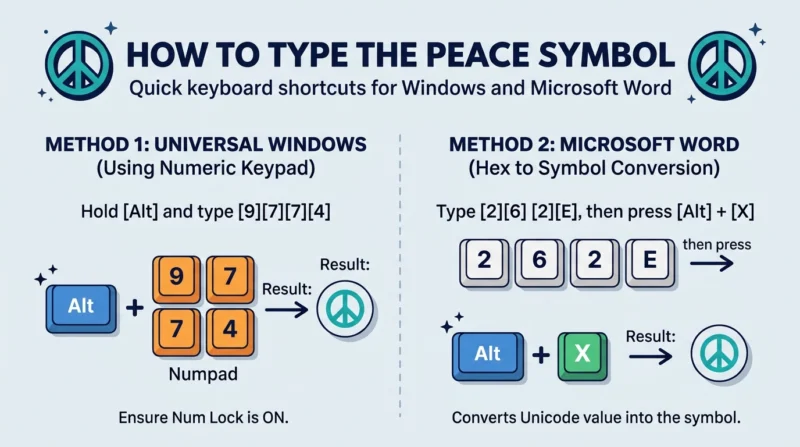
Windows operating systems support native character input via decimal ASCII and UNICODE values. To type the peace symbol using this technique, your keyboard must feature a dedicated numeric keypad.
- Ensure that the NumLock key is toggled on and the indicator light is active.
- Press and hold the ALT key on your keyboard.
- On your numeric keypad, type the sequence 9, 7, 7, 4.
- Release the ALT key. The peace symbol (☮) will instantly appear at your cursor.
If you use a compact laptop keyboard without a physical NUMPAD, you may need to enable an on-screen numeric keypad utility or rely on Microsoft Word shortcuts.
Using Microsoft Word HEX Code Shortcut
Microsoft Word provides a built-in hexadecimal conversion tool that bypasses the need for numeric keypads entirely.
- Open a document in Microsoft Word.
- Type the exact hexadecimal code: 262E.
- Immediately press ALT + X. Word will automatically translate the alphanumeric string into the target glyph (☮).
Typing the Peace Symbol on macOS
Using the Character Viewer Utility
Apple macOS manages special characters through its centralized Character Viewer palette, which provides access to the complete UNICODE catalog.
- Place your text cursor in any active text field or document.
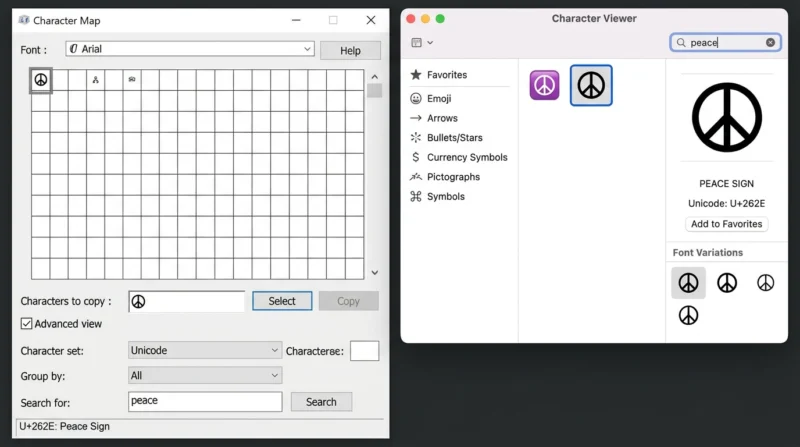
- Press the shortcut keys Control + Command + Space simultaneously to summon the Character Viewer floating panel.
- Click the small keyboard or icon in the top-right corner of the panel to expand it into full view if necessary.
- Type the word peace into the search bar at the top right.
- Locate the peace symbol (☮) in the search results and double-click it to insert it into your document.
Typing on Linux and Mobile Devices
Linux UNICODE Input
Linux desktop environments supporting GTK and GNOME allow direct hexadecimal UNICODE insertion via key combinations.
- Press and hold CTRL + SHIFT + U. An underlined small letter u will appear on the screen.
- Release those keys and type the HEX code: 262e.
- Press Enter or Space to commit the character and render the symbol (☮).
iOS and Android Emoji Keyboards
Mobile platforms handle special symbols primarily through built-in emoji and character pickers.
- iOS (iPhone / iPad): Tap the emoji button on your software keyboard, select the search bar, and type peace to locate the symbol icon.
- Android: Open your Gboard or default keyboard, tap the emoji icon, use the search function to look up peace, and select the symbol for insertion.
Frequently Asked Questions
What is the ALT code for the peace symbol?
The ALT code for the peace symbol (☮) is ALT + 9774 using a physical numeric keypad on a Windows system.
How do I type the peace symbol in Microsoft Word?
Type the UNICODE HEX value 262E directly into Microsoft Word, then immediately press ALT + X to convert the text string into the peace symbol.
What is the UNICODE code point for the peace symbol?
The official UNICODE code point for the peace symbol is U+262E, which translates to a decimal value of 9774.
How do I insert the peace symbol on a Mac?
Open the macOS Character Viewer by pressing Control + Command + Space, search for the term peace, and double-click the resulting symbol to place it in your document.