

Master Character Reference Matrix
The following data table outlines the complete collection of accented I variants, pairing every lowercase and uppercase glyph with its corresponding decimal ALT code, Mac dead-key shortcut, UNICODE HEX value, and HTML entity code.
| Glyph | Accent Type | Windows ALT Code (DEC) | Mac Shortcut | UNICODE HEX | HTML Entity |
|---|---|---|---|---|---|
| í | Acute | ALT + 0237 | OPT + E, then I | U+00ED | í |
| Í | Acute (Uppercase) | ALT + 0205 | OPT + E, then SHIFT + I | U+00CD | Í |
| ì | Grave | ALT + 0236 | OPT + `, then I | U+00EC | ì |
| Ì | Grave (Uppercase) | ALT + 0204 | OPT + `, then SHIFT + I | U+00CC | Ì |
| î | Circumflex | ALT + 0238 | OPT + I, then I | U+00EE | î |
| Î | Circumflex (Uppercase) | ALT + 0206 | OPT + I, then SHIFT + I | U+00CE | Î |
| ï | Diaeresis / Umlaut | ALT + 0239 | OPT + U, then I | U+00EF | ï |
| Ï | Diaeresis (Uppercase) | ALT + 0207 | OPT + U, then SHIFT + I | U+00CF | Ï |
Windows Input Methods
Typing accented characters on Windows operating systems requires understanding hardware layout limitations, specifically the necessity of a physical numeric keypad. Standard top-row alphanumeric keys will not register decimal character codes.
Using Numeric Keypad ALT Codes
To insert any accented I variant using decimal ALT codes, ensure that NUM LOCK is active. Press and hold the ALT key, type the exact four-digit sequence on your dedicated numeric keypad, and release the ALT key. For instance, holding ALT and pressing 0237 generates lowercase í.
Using Microsoft Word Shortcut Sequences
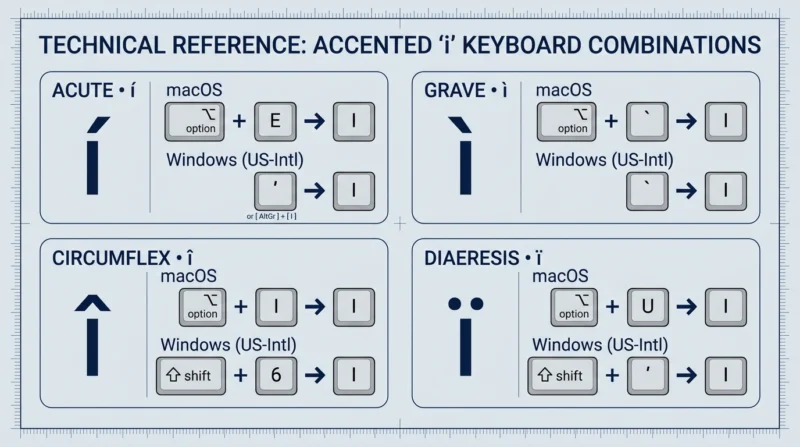
Microsoft Word provides native prefix shortcut key combinations that allow you to type an accent mark first, followed by the target letter. This method works independently of a numeric keypad:
- Acute (í): Press CTRL + ' (apostrophe), release, then press I.
- Grave (ì): Press CTRL + ` (grave accent), release, then press I.
- Circumflex (î): Press CTRL + SHIFT + ^, release, then press I.
- Diaeresis (ï): Press CTRL + SHIFT + :, release, then press I.
Macintosh Input Methods
Apple macOS utilizes intuitive dead-key combinations and visual menus for character generation.
Using Apple Dead-Key Shortcuts
Mac keyboards use modifier keys to stage accent marks before the base letter is typed. Press and release the modifier combination, then press I:
- Acute (í): Press OPT + E, then press I.
- Grave (ì): Press OPT + `, then press I.
- Circumflex (î): Press OPT + I, then press I.
- Diaeresis (ï): Press OPT + U, then press I.
Using the Press-and-Hold Character Picker
Hold down the I key for two seconds in any text field on macOS. A floating numerical palette will appear on screen. Press the corresponding number key shown beneath your desired accented variant to insert it instantly.
Microsoft Word and Advanced Equations
Professional document production frequently requires programmatic character insertion or typesetting code integration.
UNICODE HEX Conversion in Word
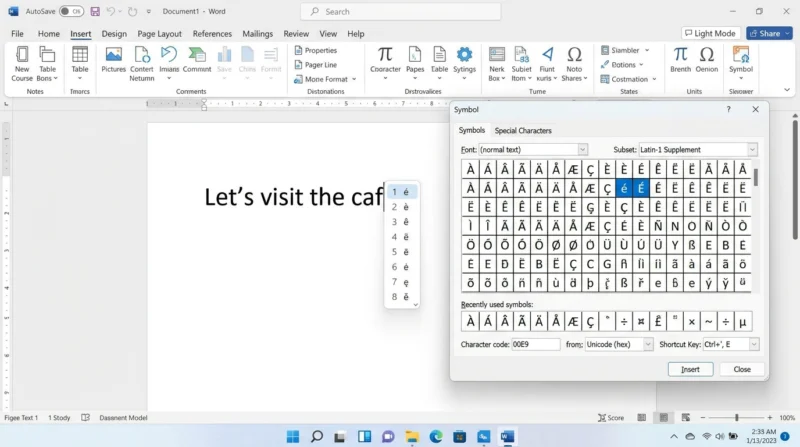
Type the hexadecimal UNICODE value directly into Microsoft Word, then press ALT + X to convert the text code into the graphical symbol. Typing 00ED followed by ALT + X converts into í.
Spreadsheet Formulas and LATEX Code
For automated calculations or technical papers, utilize these syntax rules:
- Excel Formula: Use
=CHAR(237)for lowercase í or=CHAR(205)for uppercase Í under standard ANSI code page mappings. - LATEX Code: Type
'ifor í,`ifor ì,^ifor î, and"ifor ï.
Mobile and Touchscreen Input
Virtual software keyboards on iOS and Android devices eliminate the need for key combinations by leveraging touch gestures.
Tap and hold your finger on the I key on your on-screen keyboard. After a brief pause, a secondary popup tray containing all regional variants (í, ì, î, ï) will display. Slide your finger to the selected glyph and release to insert it.
Frequently Asked Questions
How do I type an ‘i’ with an acute accent (í) on Windows?
You can type lowercase í on Windows by holding down the ALT key and typing 0237 on your numeric keypad, or by using CTRL + ' followed by I in Microsoft Word.
What is the Mac shortcut for an ‘i’ with a grave accent (ì)?
On a Mac, press OPT + ` to activate the grave dead key, release it, and then press the I key.
Why are my Windows ALT codes not working for accented letters?
ALT codes require a dedicated numeric keypad with NUM LOCK turned on, and they will not function properly if you use the horizontal row of numbers across the top of your keyboard.
How do I type an uppercase I with a diaeresis (Ï)?
On Windows, use ALT + 0207 on the numeric keypad. On Mac, press OPT + U, release, and then press SHIFT + I.