


Understanding the Different Types of Accented G Characters
Accented Latin letter G variants serve various linguistic roles across international writing systems. Writers encounter these glyphs in Turkish, Azerbaijani, Esperanto, Maltese, Latvian, and phonetic transcriptions. Recognizing individual characters prevents encoding errors and layout mismatches.
Common Linguistic Variants and Reference Matrix
The table below details every verified precomposed G modification, paired with exact UNICODE HEX values, HTML entities, and Windows numeric keypad ALT codes.
| Glyph | Character Name | UNICODE HEX | ALT Code | HTML Entity |
|---|---|---|---|---|
| ğ | Latin Small Letter G with Breve | U+011F | ALT + 0287 | ğ |
| Ğ | Latin Capital Letter G with Breve | U+011E | ALT + 0286 | Ğ |
| ĝ | Latin Small Letter G with Circumflex | U+011D | ALT + 0285 | ĝ |
| Ĝ | Latin Capital Letter G with Circumflex | U+011C | ALT + 0284 | Ĝ |
| ġ | Latin Small Letter G with Dot Above | U+0121 | ALT + 0289 | ġ |
| Ġ | Latin Capital Letter G with Dot Above | U+0120 | ALT + 0288 | Ġ |
| ģ | Latin Small Letter G with Cedilla | U+0123 | ALT + 0291 | ģ |
| Ģ | Latin Capital Letter G with Cedilla | U+0122 | ALT + 0290 | Ģ |
| ǵ | Latin Small Letter G with Acute | U+01F5 | ALT + 0501 | ǵ |
| Ǵ | Latin Capital Letter G with Acute | U+01F4 | ALT + 0500 | Ǵ |
| ǧ | Latin Small Letter G with Caron | U+01E7 | ALT + 0487 | ǧ |
| Ǧ | Latin Capital Letter G with Caron | U+01E6 | ALT + 0486 | Ǧ |
| ḡ | Latin Small Letter G with Macron | U+1E21 | ALT + 7713 | ḡ |
| Ḡ | Latin Capital Letter G with Macron | U+1E20 | ALT + 7712 | Ḡ |
| ǥ | Latin Small Letter G with Stroke | U+01E5 | ALT + 0485 | ǥ |
| Ǥ | Latin Capital Letter G with Stroke | U+01E4 | ALT + 0484 | Ǥ |
How to Type G with Accent on Windows
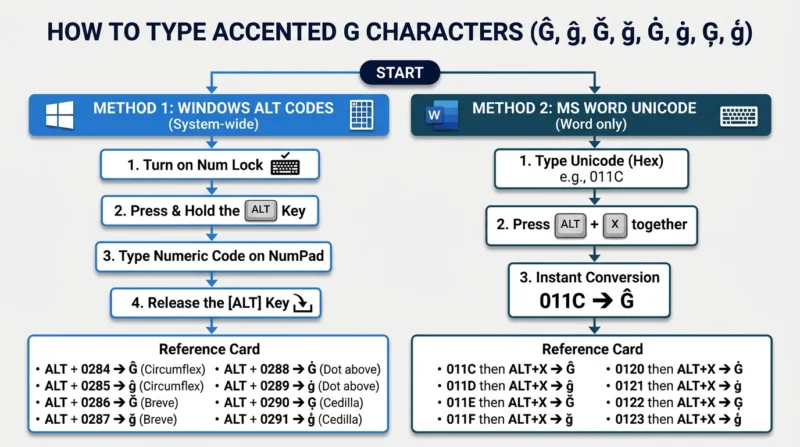
Windows operating systems provide several native mechanisms to generate accented G characters without installing custom keyboard layouts.
Using Numeric Keypad ALT Codes
Ensure your NUMPAD is active via the NUM LOCK key. Press and hold the ALT key, type the exact decimal code sequence on your numeric keypad, and release ALT. For example, holding ALT and pressing 0287 yields the Turkish ğ.
Using Microsoft Word UNICODE Conversion
Inside Microsoft Word, typing the four-digit hexadecimal code followed immediately by ALT + X converts plain text into the targeted accented character. Type 011F then press ALT + X to output ğ. Type 011D then press ALT + X to produce ĝ.
How to Type G with Accent on Mac
macOS supports international typography natively through on-screen menus and layout-specific key combinations.
Using the Press-and-Hold Accent Menu
Press and hold down the G key on your physical keyboard. A small floating numerical picker menu appears above the cursor. Click the desired accented variant with your mouse or type the corresponding index number displayed beneath the character.

Using ABC Extended Layout Sequences
When using the ABC Extended keyboard layout, specific modifier combinations generate modified G glyphs efficiently:
- ģ: Press OPTION + C, then release and press G
- ğ: Press OPTION + B, then release and press G
- ġ: Press OPTION + W, then release and press G
- ǧ: Press OPTION + V, then release and press G
- ḡ: Press OPTION + A, then release and press G
Typing Accented G on Mobile Devices
On-screen software keyboards on both iOS and Android operate similarly for international character entry.
iOS and Android Touch Keyboards
Touch and hold the g key on your virtual keyboard. A pop-up menu displays available international variants including ğ, ĝ, ġ, and ģ. Slide your finger across to highlight the target character and lift your finger to insert it.
Frequently Asked Questions
How do I type the Turkish g with breve (ğ) on Windows?
You can type the lowercase Turkish ğ by holding down the ALT key and typing 0287 on your numeric keypad, or by typing 011F in Microsoft Word followed by pressing ALT + X.
What is the shortcut for g with circumflex (ĝ) in Esperanto?
On Windows, you can produce the Esperanto ĝ using the ALT code ALT + 0285, or by entering the UNICODE value 011D in Microsoft Word and pressing ALT + X.
How do I access accented G variations on a Mac?
Press and hold the G key on your physical Mac keyboard to trigger the on-screen accent menu, then click or type the number corresponding to your desired variant.
How can I quickly copy and paste an accented G character?
You can instantly copy any required variation using the interactive click-to-copy buttons at the top of this guide, or utilize your operating system’s built-in character viewer.