

| System / Method | Shortcut or Code | Notes |
|---|---|---|
| Windows ALT Code | ALT + [Code] | Use numeric keypad |
| Mac Shortcut | Option + [Key] | Direct key combination |
| Word Shortcut | [HEX] then ALT+X | Or Insert Symbol |
| UNICODE | U+3164 | Hangul Filler |
| HTML Entity | ㅤ | Web safe |
Why WhatsApp Blocks Standard Empty Messages
The Validation Rule of Meta’s Messaging Engine
WhatsApp relies on a strict validation protocol for its messaging interface. When a user taps the send button, the application checks the payload of the message field. If the field is completely empty, or contains only standard whitespace characters generated by the spacebar, the messaging engine disables the send button or discards the input. This design prevents accidental blank submissions and optimizes network traffic on the platform.
Why Regular Spaces Fail
Standard space characters, such as the ASCII space (U+0020), are stripped or ignored by string sanitation algorithms in client applications. Even if a user inserts multiple spaces or line breaks, the layout parser trims trailing and leading whitespace. To bypass this validation check, input methods must supply a character that registers as a valid graphical glyph to the system parser while rendering with zero visual width on the recipient screen.
The Solution: Invisible UNICODE Characters
Hangul Filler (U+3164)
The Hangul Filler character (U+3164) originates from Korean typography blocks in the UNICODE standard. Although categorized as a letter placeholder, modern rendering engines display it as an empty space. Because it is recognized as a full-width typographic element by Meta messaging protocols, the app accepts it as legitimate text content and successfully transmits the chat bubble.
Braille Pattern Blank (U+2800)
Another reliable option is the Braille Pattern Blank (U+2800). This character represents an empty Braille cell. Renderers treat it as a structured character rather than an ordinary whitespace, allowing it to bypass platform input filters without triggering error flags.
Zero Width Space (U+200B)
The Zero Width Space (U+200B) is designed for line-break control in complex scripts. When pasted into a messaging input field, it takes up zero horizontal space. However, some versions of mobile chat clients strip U+200B during sanitation, making U+3164 and U+2800 more reliable choices for empty chat bubbles.
Step-by-Step Guide to Sending a Blank WhatsApp Message
How to Do It on iPhone and iOS
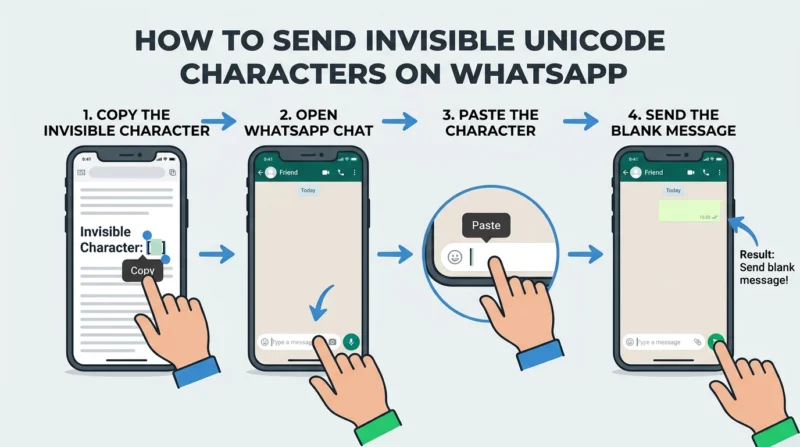
To send an empty message on an iOS device, copy an invisible UNICODE character from a reference source or note. Open the WhatsApp application and select the target chat thread. Tap the message input field to bring up the on-screen keyboard, then long-press and select Paste. Tap the green send arrow. On iOS 17 and later, approve any permission prompts regarding clipboard sharing from other applications if requested.
How to Do It on Android
Android users follow a similar workflow. Highlight and copy the invisible character from a web source. Navigate to WhatsApp, open the active conversation window, and tap the text field. Long-press the cursor area until the floating contextual menu appears. Tap Paste, then tap the send icon. The chat bubble will transmit immediately and appear entirely empty to the recipient.
How to Do It on WhatsApp Web and Desktop
For desktop users running WhatsApp Web or the native desktop client, highlight the invisible character sample block using a mouse pointer. Press CTRL + C on Windows or CMD + C on Mac to copy the selection. Click into the message input box within the desktop interface, press CTRL + V or CMD + V, and hit ENTER on your keyboard.

Troubleshooting Common Glitches
Autocorrect and Text Replacement
Mobile operating systems occasionally attempt to autocorrect or clean up copied strings that contain non-standard UNICODE symbols. If the input field refuses to send or displays an unexpected character, check device keyboard settings. Disabling automatic correction or creating a text replacement shortcut for the invisible character helps maintain reliable input functionality.
Clipboard Errors
If the clipboard fails to retain the invisible character, the paste command may insert nothing or paste previous clipboard history. To resolve this issue, clear the active clipboard cache or use a dedicated notes application to store the character string before transferring it to the messaging interface.
Frequently Asked Questions
Can you send a blank message on WhatsApp using just the spacebar?
No, WhatsApp validation rules reject messages that contain only regular whitespace characters or remain completely empty.
What is the best invisible character to use for a blank WhatsApp message?
The Hangul Filler (U+3164) and Braille Pattern Blank (U+2800) are the most reliable invisible characters for generating a blank chat bubble.
Does sending an empty message work on both iPhone and Android?
Yes, copying and pasting an invisible UNICODE character works across iOS, Android, and WhatsApp Web or Desktop.
Is sending a blank message a glitch or a safety risk?
No, it is simply a formatting workaround utilizing valid UNICODE whitespace glyphs that render with zero width on the recipient screen.