


Understanding the Anatomy of Quotes
Straight Quotes vs. Curly Quotes
Quotation marks exist in two distinct categories: straight quotes and curly quotes. Straight quotes (" and ') are legacy typewriter artifacts. Typewriters required neutral, vertical marks to save keyboard real estate, using a single key for both opening and closing quotation marks, as well as for foot and minute symbols, or prime marks. These neutral marks are part of the ASCII standard.
Curly quotes (“, ”, ‘, ’), also known as typographic quotes or smart quotes, curve toward the text they enclose. Opening quotes curve outward and downward, while closing quotes curve downward and inward. The closing single curly quote (’) doubles as the correct typographic apostrophe.
When to Use Which Format
Professional typography rules dictate that curly quotes must be used in all published prose, print books, articles, and professional documents. Using straight quotes in book publishing signals amateur typesetting.
Conversely, straight quotes are mandatory in software engineering, database management, and markup languages. Programming languages like Python, JavaScript, and HTML parse strings using straight quotes. Injecting curly quotes into code triggers syntax errors because compilers and parsers do not recognize typographic variants.
Typing Shortcuts for Windows and Mac
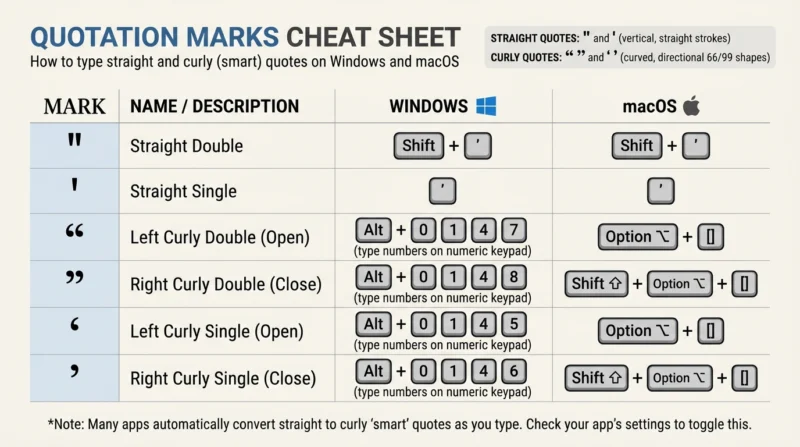
Windows ALT Codes
Windows operating systems support four-digit numeric keypad codes to generate specific quote characters. The leading zero is mandatory to target Windows-1252 character sets.
| Character | Name | Windows ALT Code | Mac Key Combo | UNICODE | Decimal | HTML Entity |
|---|---|---|---|---|---|---|
| " | Straight Double Quote | ALT + 0034 | Direct key | U+0022 | 34 | " |
| ' | Straight Single Quote | ALT + 0039 | Direct key | U+0027 | 39 | ' |
| “ | Opening Left Double Curly | ALT + 0147 | Option + [ | U+201C | 8220 | “ |
| ” | Closing Right Double Curly | ALT + 0148 | Option + SHIFT + [ | U+201D | 8221 | ” |
| ‘ | Opening Left Single Curly | ALT + 0145 | Option + ] | U+2018 | 8216 | ‘ |
| ’ | Closing Right Single Curly | ALT + 0146 | Option + SHIFT + ] | U+2019 | 8217 | ’ |
Mac OS Key Combinations
macOS maps curly quotation marks directly to the Option key modifier layer. Pressing Option + [ yields “, while adding SHIFT produces ”. For single quotes, Option + ] generates ‘, and Option + SHIFT + ] yields ’.
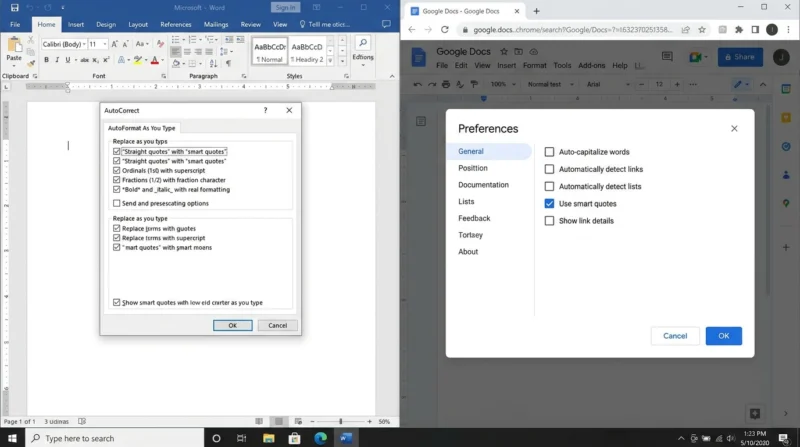
Enabling Smart Quotes in Word and Google Docs
Microsoft Word Configuration
Microsoft Word automates quote conversion through its AutoFormat engine. To verify this setting is active, navigate to File > Options > Proofing > AutoCorrect Options, then select the AutoFormat As You Type tab. Ensure that “Straight quotes” with “smart quotes” is checked. When active, typing a straight quote automatically inserts the correct opening or closing curly variant based on word boundaries.
Google Docs Preferences
Google Docs provides equivalent automation. Open a document, go to Tools > Preferences, and ensure Use smart quotes is enabled. The editor instantly converts neutral keystrokes into matching typographic quote marks.
Quick Copy and Paste Reference
All Quote Variants at a Glance
For quick reference, the complete set of characters covered in this guide is available below:
" ' “ ” ‘ ’Frequently Asked Questions
What is the difference between straight and curly quotes?
Straight quotes are vertical legacy typewriter marks used primarily in computer code, while curly quotes curve inward and are used in professional prose and publishing.
How do I type curly quotes on Windows?
You can type curly quotes on Windows by holding down the ALT key and using the numeric keypad to enter specific four-digit codes, such as ALT + 0147 for opening double quotes and ALT + 0148 for closing double quotes.
What are the keyboard shortcuts for curly quotes on a Mac?
On a Mac, you can type curly quotes using the Option key: Option + [ for “, Option + SHIFT + [ for ”, Option + ] for ‘, and Option + SHIFT + ] for ’.
Should I use curly or straight quotes in programming code?
You must always use straight quotes in programming code, markup languages like HTML, and database entries because parsers and compilers do not recognize curly typographic quote characters.