

| System / Method | Shortcut or Code | Notes |
|---|---|---|
| Windows ALT Code | ALT + 0176 | Use numeric keypad with NumLock ON |
| Mac Shortcut | Option + SHIFT + 8 | Direct key combination |
| Word Shortcut | 00B0 then ALT + X | Converts HEX code to UNICODE character |
| UNICODE | U+00B0 | Standard hexadecimal identifier |
| HTML Entity | ° or ° | Web safe markup entities |
Quick Answer: How to Type the Degree Symbol
The degree symbol (°) is an essential typographical character used in temperature measurements, geographic coordinates, and mathematical angles. Because it is absent from standard alphanumeric layouts, operating systems provide direct hardware shortcuts, UNICODE sequences, or character viewers to insert it rapidly.
Platform Shortcut Summary
Every major operating system features a dedicated method to output the degree symbol without opening external applications:
- Windows: ALT + 0176 on a numeric keypad, or WIN + . for the emoji and symbols panel.
- macOS: Option + SHIFT + 8.
- Linux / ChromeOS: CTRL + SHIFT + U, then type 00B0 and press Enter or Space.
- Mobile: Long-press the 0 key on iOS and Android virtual keyboards.
Typing the Degree Symbol on Windows
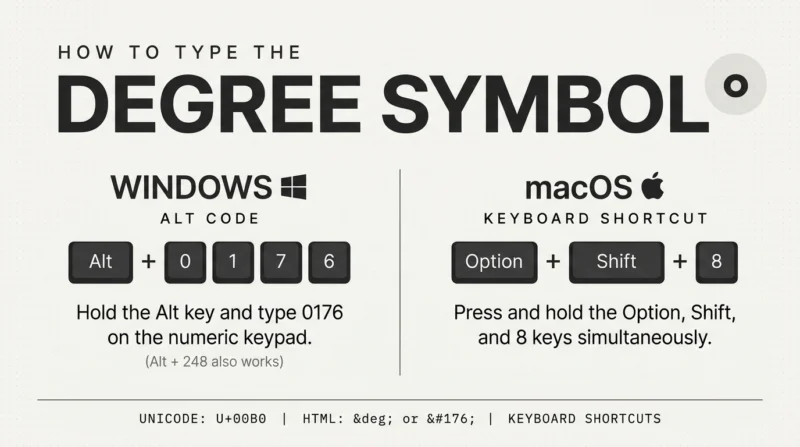
Windows provides several ways to generate the degree symbol depending on whether your keyboard includes a dedicated numeric keypad.
Using the Numeric Keypad ALT Code
Full-size keyboards equipped with a physical numeric keypad support legacy ANSI character codes. Turn NumLock on, press and hold the ALT key, and type 0176 sequentially on the keypad. Release the ALT key to render the ° character. Alternatively, ALT + 248 produces the same result on standard Windows installations.
Typing Without a Number Pad using the Emoji Panel
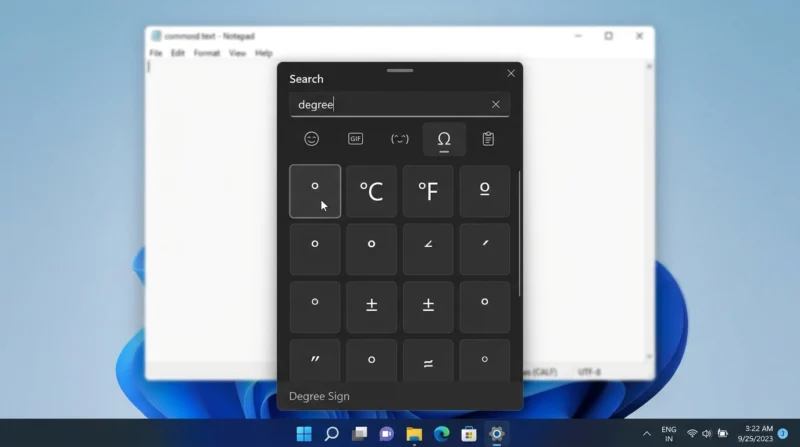
Compact keyboards, laptop layouts, and tenkeyless boards lack a numeric keypad. To input the degree symbol on these devices, press WIN + . to launch the native Windows emoji and symbols dialog box. Navigate to the symbols category indicated by the omega icon, or type degree directly into the search bar. Click the matching symbol to insert it into your active text field.
Using Microsoft Word Shortcuts
Microsoft Word includes specialized text formatting tools for scientific and technical drafting. Type the hexadecimal code 00B0 directly into your document, then press ALT + X to convert the text string into the degree symbol. You can also utilize spreadsheet formulas in Excel by entering =CHAR(176) in any cell to output the character.
Typing the Degree Symbol on macOS
Apple keyboards rely on modifier key combinations to access secondary character layers.
The Standard Mac Keyboard Shortcut
Position your text cursor where you want the symbol to appear. Press and hold the Option and SHIFT keys simultaneously, then press 8. Release all keys to insert the degree symbol. This shortcut functions universally across text editors, web browsers, and presentation software on Apple silicon and Intel systems.
Typing the Degree Symbol on Chromebook and Linux
Chromebooks and modern Linux distributions use standard UNICODE HEX input protocols to output specialized glyphs.
Using UNICODE HEX Input
Press CTRL + SHIFT + U simultaneously. An underlined small letter u appears on the screen. Type 00B0 and press Enter or Space to finalize the conversion. On standard Linux desktop environments equipped with a compose key, pressing Compose followed by o and o also outputs the degree symbol.
Typing the Degree Symbol on Mobile Devices
Virtual keyboards on smartphones and tablets rely on gesture controls and touch interfaces to access secondary symbol layers.
iOS and Android Long-Press Method
Switch your virtual keyboard to the numeric layout by tapping the ?123 or 123 key. Tap and hold your finger down on the 0 key. A small pop-up menu displays alternative characters related to zero, including the degree symbol (°). Slide your finger to select the symbol and lift it to insert the character into your text input field.
Frequently Asked Questions
What is the fastest way to type the degree symbol on Windows?
If you have a numeric keypad, hold down ALT and type 0176. Otherwise, press WIN + . to open the symbols panel and search for degree.
How do you type the degree symbol on a Mac?
Press and hold Option + SHIFT + 8 simultaneously to insert the degree symbol.
What is the UNICODE code point for the degree symbol?
The UNICODE code point for the degree symbol is U+00B0, with a decimal value of 176.
How do I type a degree symbol on my iPhone or Android phone?
Tap and hold the number 0 key on your virtual keyboard until a pop-up menu appears showing the degree symbol, then slide your finger to select it.