
| System / Method | Shortcut or Code | Notes |
|---|---|---|
| Windows ALT Code | ALT + 95 | Use numeric keypad |
| Mac Shortcut | SHIFT + - | Direct key combination |
| Word Shortcut | 005F then ALT+X | HEX UNICODE conversion |
| UNICODE | U+005F | Standard HEX code |
| HTML Entity | _ | Web safe |
Quick Answer How to Type the Underscore
Standard Keyboard Shortcut
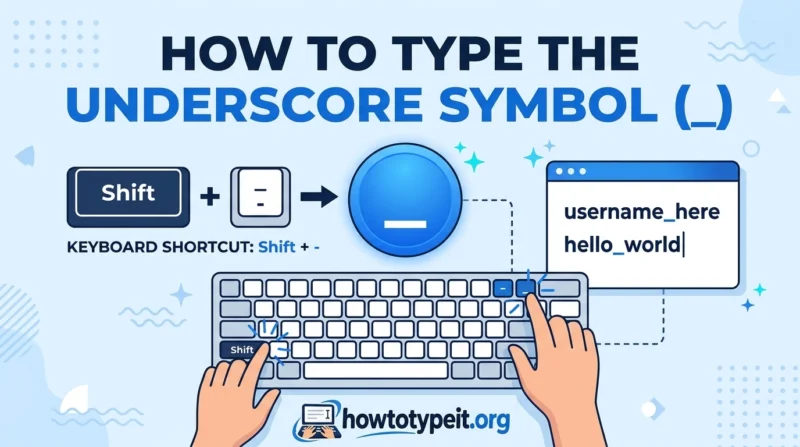
To produce the underscore symbol (_), press and hold either SHIFT key while pressing the hyphen and minus key. This shortcut works universally across Windows, macOS, Linux, and ChromeOS physical keyboards.
Visual Location on the Keyboard
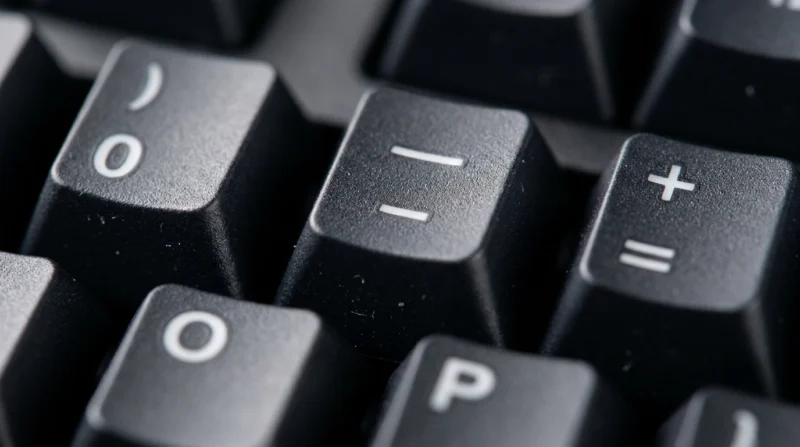
The physical key for the underscore shares space with the hyphen and minus sign. On standard ANSI and ISO layout keyboards, it sits directly to the right of the zero (0) key and to the left of the equals (=) key on the top row of letter keys. Without holding SHIFT, pressing this key outputs a hyphen (-). Holding SHIFT shifts the key layer to output the underscore (_).
Typing the Underscore on Operating Systems
Windows Desktop and Laptops

On Windows running standard layouts, use the primary shortcut:
- Press and hold SHIFT + -
If the keyboard lacks a functioning hyphen key, use the alternative numeric keypad method:
- Press and hold ALT
- Type 95 on the numeric keypad
- Release ALT
Apple macOS
On Apple Mac keyboards, the underscore input mirrors Windows layouts:
- Press and hold either SHIFT + -
For international Apple layouts or custom keymaps, use the macOS Character Viewer by pressing Control + CMD + Space, then search for “underscore” or “low line”.
Alternative Windows ALT Codes
Beyond the standard NUMPAD code ALT + 95, HEX-based input tools like WinCompose or custom AutoHotkey scripts allow direct UNICODE insertion. Users encountering NUMPAD restrictions can create custom macros mapping shortcuts like CTRL + SHIFT + - to the underscore glyph.
Using-the-Underscore-on-Mobile-Devices
iOS Apple iPhone and iPad
On the default iOS virtual keyboard:
- Tap the 123 key in the bottom-left corner.
- Tap the symbols key labeled #+= to access the secondary symbol layout.
- Tap the _ key.
Android Smartphones and Tablets
On Android virtual keyboards (such as Gboard or Samsung Keyboard):
- Tap the ?123 or 123 key.
- Tap the secondary symbols page toggle (such as #+= or =<).
- Tap the _ key.

Advanced Input Methods and Codes
Microsoft Word UNICODE Shortcuts
In Microsoft Word and Outlook on Windows, type the hexadecimal UNICODE value directly into the document editor:
- Type 005F
- Press ALT + X to convert the HEX code instantly into _.
HTML Entities and Programming Use
In web development and software engineering, the underscore serves variable naming conventions in Python, SQL, C++, and CSS. Use these formats in markup or code:
- HTML Entity Name: N/A (use numeric or literal)
- HTML Entity Decimal: _
- HTML Entity Hexadecimal: _
- UNICODE HEX: U+005F
- CSS Escape: 0005F
Frequently Asked Questions
How do I type an underscore on a standard keyboard?
To type an underscore, press and hold the SHIFT key and press the hyphen/minus (-) key located to the right of the zero (0) key on the top letter row.
What is the ALT code for the underscore symbol?
The verified Windows ALT code for an underscore is ALT + 95, typed by holding the ALT key and entering 95 on the numeric keypad.
How do you type an underscore on a Mac?
On an Apple Mac keyboard, you type an underscore by holding down either SHIFT key and pressing the hyphen/minus key.
What is the UNICODE value for the underscore symbol?
The underscore character has a UNICODE value of U+005F and a decimal value of 95.