

| System / Method | Shortcut or Code | Notes |
|---|---|---|
| Windows ALT Code | ALT + 8378 | Requires a dedicated numeric keypad |
| Mac Shortcut | Character Viewer | Search for “Turkish Lira Sign” |
| Word Shortcut | 20BA then ALT + X | Converts HEX code to UNICODE glyph |
| UNICODE | U+20BA | TURKISH LIRA SIGN |
| HTML Entity | ₺ or ₺ | Web safe decimal and hexadecimal entities |
Quick Copy and Paste
Instant Lira Symbol Access
The fastest method to insert the Turkish Lira symbol (₺) into documents, spreadsheets, or web forms without memorizing complex key combinations is direct clipboard copying. Highlight the symbol here: ₺, press CTRL + C (Windows) or CMD + C (Mac), and paste it into your target application using CTRL + V or CMD + V.
Typing on Windows
Using ALT Codes
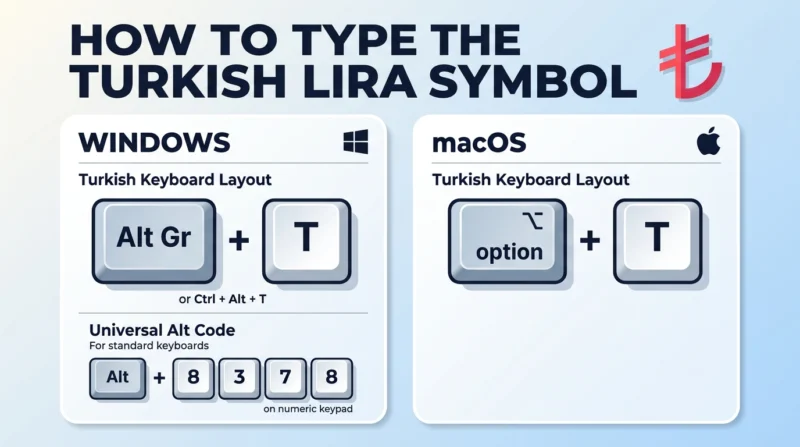
Windows operating systems support legacy numeric keypad entry. Ensure your Num Lock is active, hold down the ALT key, and type 8378 on your numeric keypad. Release the ALT key to render the ₺ sign. Note that standard top-row number keys will not work for this method.
Using Microsoft Word UNICODE Shortcut
In Microsoft Word, Outlook, and other rich text environments, type the hexadecimal UNICODE value 20BA directly into your document, then immediately press ALT + X. The text string transforms automatically into the Turkish Lira symbol.
Using a Turkish Keyboard Layout
If your operating system has the official Turkish Q or Turkish F keyboard layout enabled, you can generate the symbol directly by pressing AltGr + T.
Typing on Mac and Linux
Using macOS Character Viewer
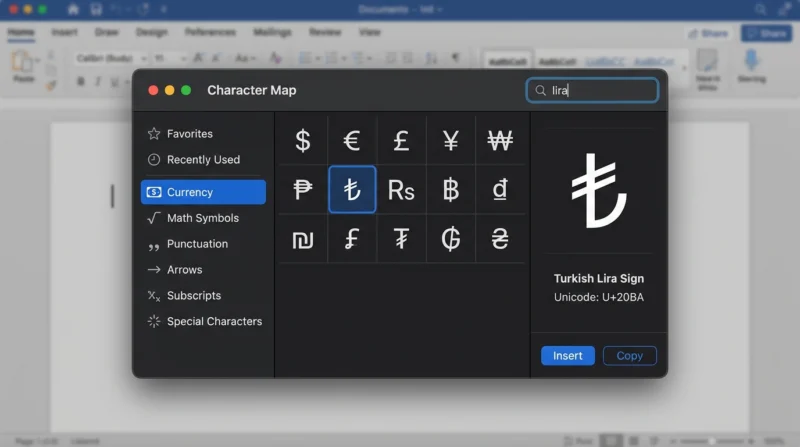
Apple macOS handles currency symbols through the Character Viewer utility. Press Control + Command + Space to open the Character Viewer panel. Type “Turkish Lira” into the search bar, locate the ₺ glyph in the search results, and double-click it to insert it into your active text field.
Using Linux Compose and UNICODE Input
Linux distributions supporting GTK environments allow direct UNICODE point insertion. Press CTRL + SHIFT + U, release the keys (an underlined u will appear), type 20ba, and press Enter or Space to finalize the character.
Typing on Mobile Devices
iOS and Android Long-Press Menus
Mobile virtual keyboards on iOS and Android streamline currency input. Open your system keyboard, navigate to the numeric and symbol layout, and tap and hold the standard dollar sign ($) or pound sign (£). A secondary popup menu will display regional currency alternatives, allowing you to select the ₺ symbol.
Spreadsheets and Code
Excel Formulas and HTML Entities
For programmatic deployment, use the HTML decimal entity ₺ or the hexadecimal entity ₺ within web documents. In Microsoft Excel, you can generate the character dynamically using the formula =CHAR(8378) or apply a custom cell formatting string like "₺"#,##0.00 to designate financial figures in TRY.
Frequently Asked Questions
What is the UNICODE code point for the Turkish Lira symbol?
The Turkish Lira symbol is officially encoded at U+20BA in the UNICODE standard.
How do I type the Turkish Lira symbol in Microsoft Word?
Type 20BA and immediately press ALT + X on your keyboard to convert the code into the ₺ sign.
What is the ALT code for the Turkish Lira symbol on Windows?
You can type the symbol by holding down the ALT key and typing 8378 on your numeric keypad.
How do I type the Lira sign using a Turkish keyboard layout?
On a standard Turkish Q keyboard layout, you can generate the symbol by pressing AltGr + T.