

| System / Method | Shortcut or Code | Notes |
|---|---|---|
| Windows ALT Code | ALT + 3 or ALT + 165 | Use numeric keypad with NumLock active |
| Mac Shortcut | CTRL + CMD + Space | Open Character Viewer, search for “Club” |
| Word Shortcut | 2663 then ALT + X | Converts HEX code to ♣ in Microsoft Office |
| UNICODE | U+2663 | Standard hexadecimal code point |
| HTML Entity | ♣ or ♣ | Web-safe markup representation |
Quick Copy and Paste Club Symbols
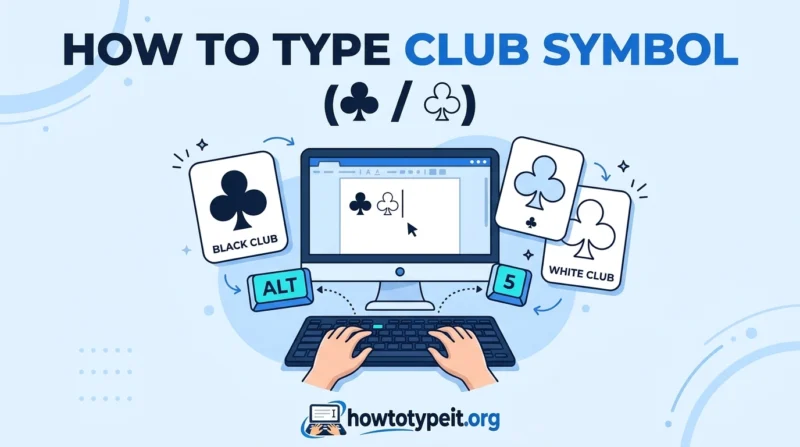
If you need to instantly grab card suit characters without memorizing keystrokes, use the interactive elements below. These blocks provide both solid and outlined club variants for document editors, chat applications, and web publishing workflows.
Black Club Suit
The standard filled glyph (♣) appears most frequently in typography, playing card notation, and game design. It belongs to the Miscellaneous Symbols block in the UNICODE standard and renders consistently across modern operating systems and web browsers.
White Club Suit
The outlined variant (♧) offers stylistic contrast for game layouts, diagrams, and specialized typographic layouts. While less common than its solid counterpart, it shares identical support in UNICODE and HTML environments.
How to Type Club Symbol on Windows PC
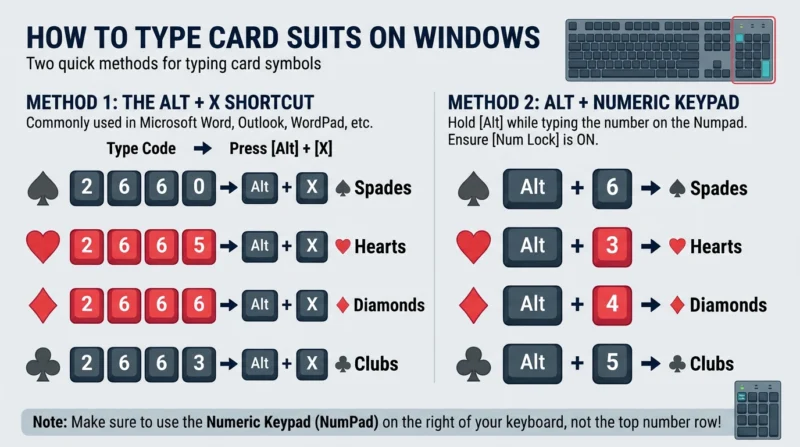
Windows provides multiple pathways to generate card suit symbols depending on your hardware layout and software environment. Physical numeric keypads and modern word processors offer the fastest execution.
Using Numeric Keypad ALT Codes
To use hardware key codes, ensure your keyboard has an active numeric keypad:
- Verify that NUMLOCK is enabled on your keyboard.
- Press and hold down either ALT key.
- Type 3 or 165 on the numeric keypad.
- Release the ALT key to render the club symbol (♣).
Note that standard number row keys across the top of a keyboard do not process ALT codes correctly. Laptops without a dedicated numeric keypad must rely on software character maps or the Microsoft Office conversion method.
Using Microsoft Word ALT+X Shortcut
Microsoft Office applications across Windows support direct UNICODE HEX conversion:
- Open Microsoft Word, Outlook, Excel, or PowerPoint.
- Type the hexadecimal code 2663 for the solid club or 2667 for the white club.
- Immediately press ALT + X.
- The text string converts instantly into the corresponding club symbol.
Typing Club Symbols on Mac and Mobile
Apple macOS and touch-screen devices handle special characters through built-in viewers and touch keyboards rather than legacy hardware numeric codes.
Using the macOS Character Viewer
Apple computers rely on the system character palette for suit symbols:
- Place your text cursor in any editable text field.
- Press CTRL + CMD + SPACE to open the Character Viewer panel.
- Type “club” into the search bar at the top right.
- Double-click the black club (♣) or white club (♧) to insert it into your document.
Mobile and Tablet Input Methods
On iOS and Android virtual keyboards, suit characters are typically accessed through the symbols pane:
- Switch your mobile keyboard to the numbers and symbols layout by tapping 123 or ?#$.
- Tap the secondary symbols modifier key (often labeled = or <).
- Locate the card suits within the symbol matrix and tap to insert. Alternatively, copy the symbol directly from a mobile browser reference page.

HTML Entities and UNICODE Reference
Web developers and technical writers implement card symbols using standardized entity names or direct UNICODE code points to ensure cross-platform rendering accuracy.
Web Design Codes
In HTML documents, you can use named entities or decimal references:
- Named entity for black club:
♣renders as ♣ - Decimal reference for black club:
♣renders as ♣ - Hexadecimal reference for black club:
♣renders as ♣ - Decimal reference for white club:
♧renders as ♧ - Hexadecimal reference for white club:
♧renders as ♧
UNICODE Code Points
Both characters reside in the Miscellaneous Symbols block of the UNICODE standard:
- Black Club Suit: U+2663 (Decimal: 9827)
- White Club Suit: U+2667 (Decimal: 9831)
Frequently Asked Questions
What is the keyboard shortcut to type the club symbol in Microsoft Word?
Type 2663 and immediately press ALT + X on your keyboard to convert the code into the black club symbol (♣).
What is the ALT code for the club symbol on a Windows numeric keypad?
Hold down the ALT key and type 3 or 165 on your numeric keypad, then release ALT to insert the club symbol.
What is the UNICODE value for the black club suit?
The black club suit has a UNICODE value of U+2663 and a decimal code of 9827.
How do I type an outline or white club symbol (♧)?
You can type 2667 and press ALT + X in Microsoft Word or copy the white club symbol directly from a character reference table.