

| System / Method | Shortcut or Code | Notes |
|---|---|---|
| Windows HEX Conversion | 20BA then ALT + X | Works in Microsoft Word and Outlook |
| Windows ALT Code | ALT + 8378 | Requires numeric keypad |
| Mac Character Viewer | CTRL + CMD + SPACE | Search for “Turkish Lira” |
| Linux UNICODE Entry | CTRL + SHIFT + U, then 20BA | Universal GTK input method |
| HTML Entity | ₺ | Standard web markup reference |
| UNICODE HEX | U+20BA | Official UNICODE standard code |
Understanding the Two Lira Symbols
Typing currency signs correctly requires distinguishing between the two distinct characters associated with the name lira. Digital environments recognize both the modern Turkish Lira sign and the historical legacy lira sign, each governed by separate UNICODE standards and input methods.
The Modern Turkish Lira (₺)
Adopted in 2012 by the Central Bank of the Republic of Turkey, the official Turkish Lira sign is represented by UNICODE code point U+20BA. The glyph resembles an uppercase letter L intersected by two diagonal parallel ascenders angled at 20 degrees. Spreadsheet formulas, financial documentation, and international banking applications use the formal ISO currency code TRY when this font glyph is unavailable.
The Legacy Lira Sign (₤)
Represented by UNICODE code point U+20A4, the legacy lira sign features an uppercase Latin letter L crossed with two horizontal lines. This character historically represented pre-euro currencies such as the Italian lira and Maltese lira. Modern contexts rarely require this specific glyph, but software developers and historical archivists frequently encounter it.
How to Type the Lira Symbol on Windows
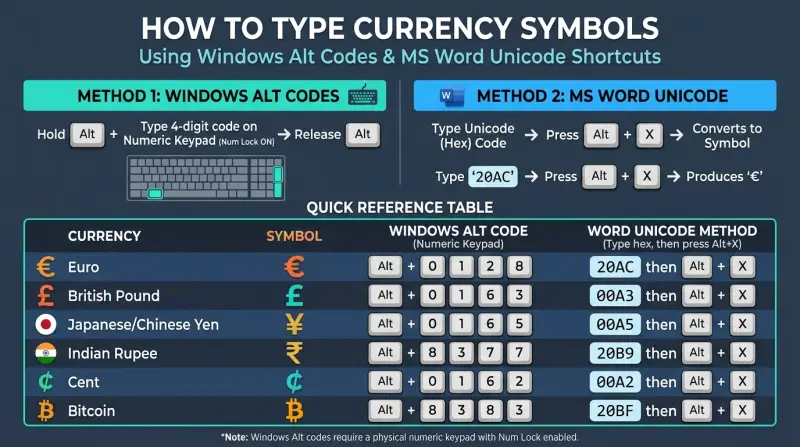
Windows operating systems offer multiple pathways to insert the Turkish Lira sign into text editors, word processors, and web forms.
Using Microsoft Word HEX Conversion
Microsoft Word and Outlook support instant UNICODE conversion. Type 20BA directly into your document, then press ALT + X simultaneously. The text string transforms instantly into ₺. Repeating this sequence with 20A4 produces the legacy lira sign ₤.
Using Numeric ALT Codes
Standard keyboards equipped with a dedicated numeric keypad can utilize numeric ALT codes. Hold down the ALT key while typing 8378 on the NUMPAD, then release ALT. Note that top-row number keys do not trigger ALT codes.
Turkish Keyboard Layout Shortcuts
Users running Windows with the Turkish Q or Turkish F keyboard layout enabled can generate the Turkish Lira symbol by pressing ALTGR + T. This system-level mapping eliminates the need for manual character code entry.
Typing Lira on Mac and Linux
Apple macOS and Linux distributions manage special character input through built-in viewer tools and terminal shortcuts.
Mac Character Viewer Method
macOS does not assign a default single-key shortcut to the Turkish Lira sign. To insert the character, press CTRL + CMD + SPACE to open the Character Viewer. Type Turkish Lira into the search bar at the top right of the panel, then double-click the ₺ result to insert it into your active text field.

Linux Compose and UNICODE Entry
Linux environments running GTK frameworks support direct hexadecimal UNICODE input. Press CTRL + SHIFT + U together, release the keys (an underlined u appears on screen), type 20ba, and press ENTER.
Quick Copy and Paste Options
Frequent writers and data entry specialists often save time by deploying clipboard management tools or operating system text replacement shortcuts.
Instant Clipboard Retrieval
When typing applications lack native font support for ₺, users can copy the character directly from the hero element at the top of this guide and paste it using CTRL + V on Windows or CMD + V on Mac.
Setting Up Mobile Text Replacements
iOS and Android devices lack dedicated Turkish Lira keys on standard English keypads. To establish a permanent shortcut, copy ₺ to your mobile clipboard, navigate to your device keyboard settings, and assign a shortcut phrase such as !lira to auto-expand into ₺.
Frequently Asked Questions
What is the difference between ₺ and ₤?
The ₺ symbol (U+20BA) is the official modern Turkish Lira sign introduced in 2012, whereas ₤ (U+20A4) is the legacy double-bar lira sign used historically by European nations.
How do I type the Turkish Lira symbol in Microsoft Word?
Type the UNICODE HEX code 20BA and immediately press ALT + X on your keyboard to convert it directly into the ₺ symbol.
Can I use an ALT code to type the Lira sign on Windows?
Yes, you can hold down the ALT key and type 8378 on your numeric keypad, though behavior can vary depending on your active application and font support.
What should I do if my system does not support the Turkish Lira symbol?
When system fonts or legacy layouts lack support for the glyph, standard financial style guides recommend using the official currency code TRY.