

- Most mechanical keyboards are water-resistant or spill-resistant, not fully waterproof.
- Liquids enter through switch stems and PCB gaps, causing short circuits or corrosion.
- IP ratings determine protection levels, ranging from light splash resistance to complete submersion.
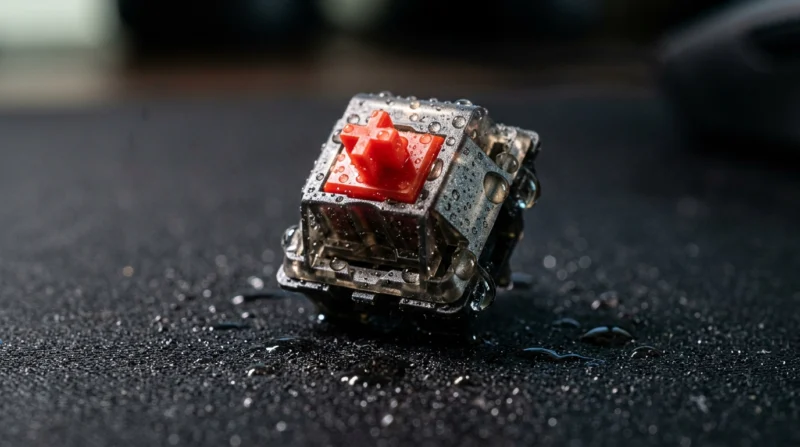
The Short Answer: Waterproof Versus Water-Resistant
Mechanical keyboards are not universally waterproof. While marketing terms often blur the lines between accidental spill protection and complete fluid immunity, standard mechanical hardware uses exposed electrical contacts, printed circuit boards (PCBs), and metal switch leaves that corrode upon contact with liquids. Understanding the distinction prevents permanent hardware failure.
Understanding IP Ratings
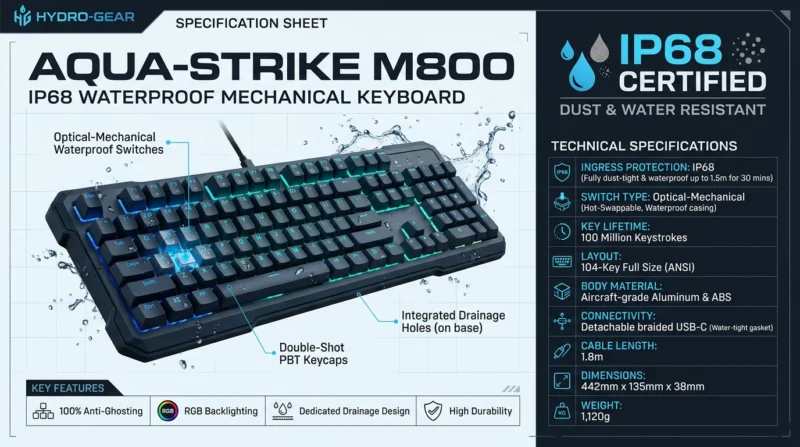
True environmental protection is measured by Ingress Protection (IP) ratings. An IP rating consists of two digits. The first digit measures solid particle protection, while the second digit measures liquid protection. A rating like IP32 indicates protection against solid objects greater than 2.5 millimeters and vertical dripping water when tilted at a 15-degree angle. High-end ruggedized models might boast an IP57 or IP68 rating, which permits limited or complete continuous submersion. However, the vast majority of gaming and office mechanical keyboards carry no official IP rating at all.
Can You Submerge a Mechanical Keyboard?
You cannot submerge a standard mechanical keyboard in water, soapy solutions, or cleaning liquids. Dunking a non-waterproof keyboard floods the switch housings, traps moisture between the plate and the PCB, and damages the microcontroller. Even if the keyboard appears functional after drying, mineral deposits left behind by tap water or sticky sugars from soda initiate galvanic corrosion, destroying copper traces over time.
How Manufacturers Protect Mechanical Keyboards from Spills

Engineers employ various architectural strategies to mitigate liquid damage without sacrificing the tactile feel of mechanical switches. These design choices determine how a device handles a sudden spill.
Drainage Holes and Channels
Many spill-resistant mechanical keyboards feature engineered drainage channels molded directly into the bottom chassis. When a liquid spill occurs, gravity guides the fluid through internal valleys and out through small drainage holes on the bottom of the case. This prevents pooling around sensitive circuit components. While effective against quick coffee or water splashes, drainage channels cannot protect against complete submersion or viscous liquids like juice and energy drinks.
Sealed Switches and Optical Technology
Some modern keyboards utilize optical switches or mechanical switches fitted with silicone gaskets and nano-coatings. Optical switches actuate via a break in an infrared light beam rather than physical metal leaf contact, making the switch mechanism itself immune to liquid-induced electrical shorts. Manufacturers also apply conformal coatings to the PCB to repel moisture, protecting critical solder joints and surface-mount diodes from immediate short-circuiting.
What to Do Immediately If You Spill Liquid on Your Keyboard
If an accident occurs, rapid physical intervention dictates whether your hardware survives. Follow strict emergency protocols to mitigate permanent damage.
Emergency Disconnection Steps
Disconnect the keyboard immediately to cut electrical current flowing through the wet circuit board. If the device is wireless, turn off the power switch and remove all batteries. For wired models, yank the USB cable from your computer port without waiting to safely eject the device. Preventing electrical shorts caused by the interaction of live current and conductive liquid takes precedence over software safety.
Drying and Recovery Techniques
Turn the keyboard upside down in an A-frame tent position to let gravity pull liquid away from the switches and PCB. Remove all keycaps using a wire keycap puller. Wipe away visible residue with a lint-free microfiber cloth. Leave the hardware to air dry in a well-ventilated area for a minimum of 48 to 72 hours. Avoid using a hair dryer on high heat settings, as excessive thermal energy warps plastic keycaps and pushes moisture deeper into switch housings.
Frequently Asked Questions
Are mechanical keyboards waterproof?
No, standard mechanical keyboards are not waterproof, though some specialized models feature water-resistant designs or specific IP ratings.
What does an IP rating mean on a keyboard?
An Ingress Protection (IP) rating indicates how well a device resists solids and liquids, such as IP32 for light splashes or IP68 for full submersion resistance.
Can I wash my mechanical keyboard in the sink?
You should never submerge a standard mechanical keyboard in water or soapy solutions unless it is explicitly rated for full submersion by the manufacturer.
What should I do if I spill coffee on my mechanical keyboard?
Immediately unplug the keyboard from your computer, turn it upside down to drain excess liquid, remove the keycaps, and let it dry completely before attempting to use it again.