


UNICODE Subscript Character Reference
| Symbol | Description | UNICODE HEX | UNICODE DEC |
|---|---|---|---|
₀ |
Subscript Zero | U+2080 | 8320 |
₁ |
Subscript One | U+2081 | 8321 |
₂ |
Subscript Two | U+2082 | 8322 |
₃ |
Subscript Three | U+2083 | 8323 |
₄ |
Subscript Four | U+2084 | 8324 |
₅ |
Subscript Five | U+2085 | 8325 |
₆ |
Subscript Six | U+2086 | 8326 |
₇ |
Subscript Seven | U+2087 | 8327 |
₈ |
Subscript Eight | U+2088 | 8328 |
₉ |
Subscript Nine | U+2089 | 8329 |
Understanding Subscript Formatting Versus UNICODE Glyphs
Active Text Formatting
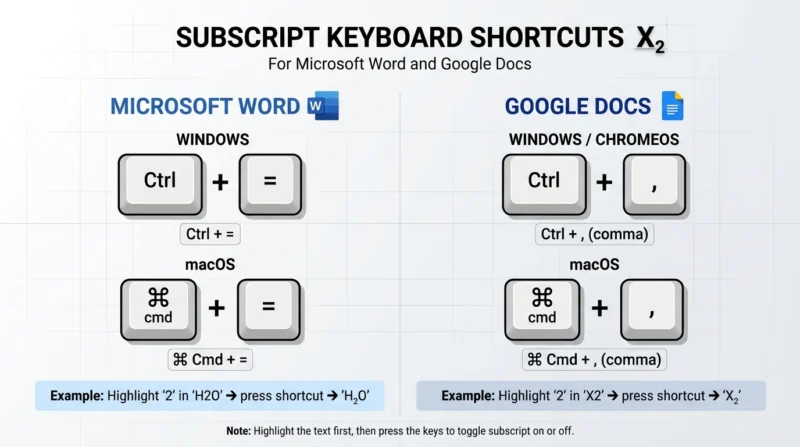
Active text formatting shifts baseline character placement dynamically while retaining normal font metrics. When you apply subscript formatting in word processors, the selected characters scale down and drop below the standard text baseline. This method preserves full searchability and font matching, which is ideal for chemical formulas like $H_2O$ and mathematical variables.
UNICODE Subscript Characters
UNICODE subscript glyphs function as standalone characters rather than formatting instructions. You can paste them directly into plain text boxes, search fields, and social media apps where formatting commands fail. However, UNICODE lacks complete alphabetic coverage, restricting reliable plain text entry mostly to numbers and select symbols.
How to Subscript in Microsoft Word
Using Keyboard Shortcuts
To toggle subscript in Microsoft Word on Windows, highlight your target text and press CTRL + =. To revert back to standard text, press the same shortcut combination again. On macOS systems, verify your specific Office layout preferences or use the ribbon interface.
Using the Ribbon Menu
Navigate to the HOME tab on the Word ribbon. Locate the Font group and click the Subscript icon, which displays a lowercase letter with a small numeric two underneath it (X₂).
How to Subscript in Google Docs
Using Keyboard Shortcuts
Highlight the text you want to adjust in Google Docs. On Windows and ChromeOS, press CTRL + , to apply subscript formatting. On macOS, use CMD + ,.
Using the Format Menu
Click Format in the top application menu bar. Hover over Text, then select Subscript from the cascading options list.
How to Subscript in Microsoft Excel
Navigating the Format Cells Dialog
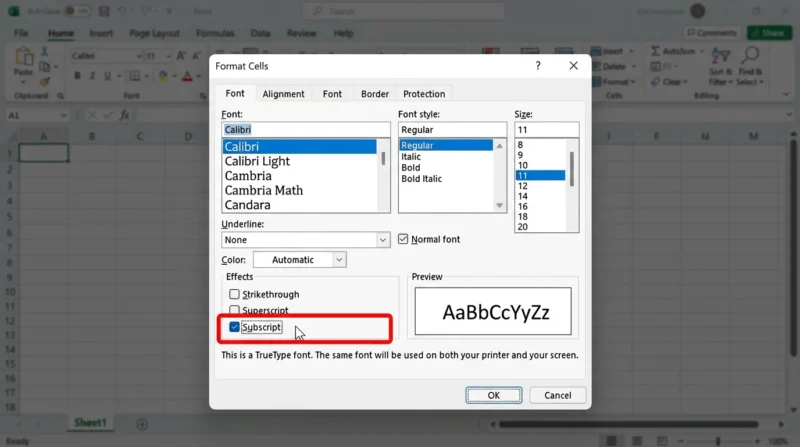
Microsoft Excel handles cell formatting differently than document processors by lacking a single direct keyboard toggle for subscript inside active text editing mode. To format a portion of a cell, double-click the cell or press F2, highlight only the specific characters you want to change, and press CTRL + 1 to open the Format Cells dialog window.
Step-by-Step Cell Editing
Inside the Format Cells window, look at the Font tab. Check the box labeled Subscript under the Effects section. You can press ALT + B to check this box quickly via keyboard navigation, then press ENTER to apply the change.
Frequently Asked Questions
What is the keyboard shortcut for subscript in Microsoft Word?
Select the target text and press CTRL + = on Windows to instantly toggle subscript formatting.
How do you make text subscript in Google Docs?
Highlight the characters you want to change and press CTRL + , on Windows and ChromeOS, or navigate to Format > Text > Subscript.
Why is there no direct subscript keyboard shortcut in Excel?
Excel processes entire cell data streams by default, requiring you to use CTRL + 1 to open the Format Cells dialog box and enable the Subscript effect on specific highlighted characters.
Can I copy and paste subscript numbers instead of formatting them?
Yes, UNICODE subscript characters like ₀, ₁ and ₂ can be copied and pasted directly into plain text fields where font styling and formatting commands are unsupported.