


Quick Copy and Paste Circle Symbols
Circle symbol text characters serve multiple design functions across digital platforms, ranging from unordered list bullets and checkbox markers to geometric layout guides. Utilizing the interactive symbol grid pad above allows instant copying of the most frequent geometric variants. Primary geometric options include the white hollow circle, the solid black disk, the dotted construction circle, the bullseye variant, and larger scaling circles used in technical markup.
| Symbol | Name / Use Case | UNICODE HEX | Decimal | Windows ALT Code |
|---|---|---|---|---|
| ○ | White Circle | U+25CB | 9675 | ALT + 9 |
| ● | Black Circle | U+25CF | 9679 | ALT + 9679 |
| ◌ | Dotted Circle | U+25CC | 9676 | ALT + 9676 |
| ◉ | Bullseye / Fisheye | U+25C9 | 9673 | ALT + 9673 |
| ◯ | Large Circle | U+25EF | 9711 | ALT + 9711 |
| ◍ | Circle With Vertical Fill | U+25CD | 9677 | ALT + 9677 |
Primary Geometric Circle Variants
Geometric font selections incorporate shapes tailored for technical illustration and typography layout. The standard white circle (○) acts as an open outline element, whereas the black circle (●) functions as a heavy bullet point. Designers employ the dotted circle (◌) to represent combining character anchors in linguistic and phonetic charts, displaying how diacritics align around base glyphs.
Hollow vs. Solid Fill Indicators
Document forms and multiple-choice tests rely heavily on contrast between hollow and solid circles. Marking options require precise insertion methods depending on the target software environment. Spreadsheets, word processors, and plain text boxes process these characters via specific keyboard hooks or character encoding rules.
How to Type Circle Symbols on Windows
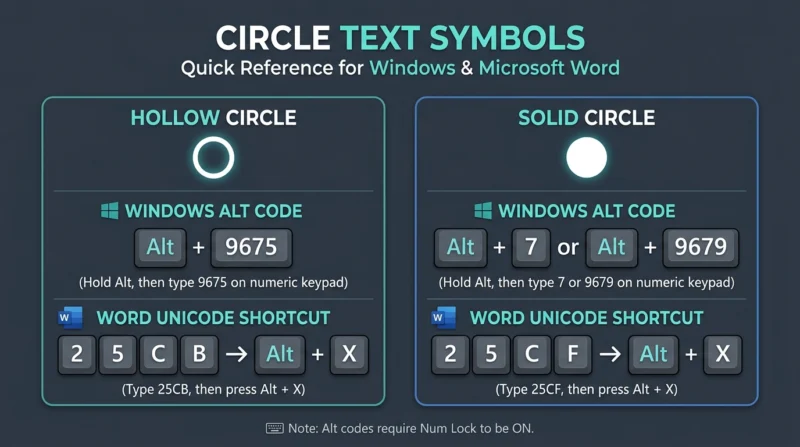
Windows operating systems offer native methods for generating circle text symbols without requiring external clipboard managers. Two primary systems govern this process: numeric keypad input sequences and Microsoft Word UNICODE HEX transformations.
Using NUMPAD ALT Codes
To output a character directly using the numeric keypad, verify that NUM_LOCK is active. Press and hold the ALT key, type the corresponding decimal code on the dedicated NUMPAD, and release ALT. For example, holding ALT while pressing 9 generates the white circle (○), while ALT + 9679 produces the black circle (●).
Using Word UNICODE HEX Shortcuts (ALT + X)
Within Microsoft Word and Outlook, users can type the raw UNICODE hexadecimal code directly into the document editor and instantly convert it. Typing 25CB followed immediately by pressing ALT + X converts the text string into ○. Similarly, entering 25CF and pressing ALT + X renders ●.
Entering Circle Symbols on Mac and Mobile
Operating systems outside of Windows handle geometric symbols through dedicated viewer panels, emoji pickers, or standard software integration layers.
macOS Character Viewer Workflow
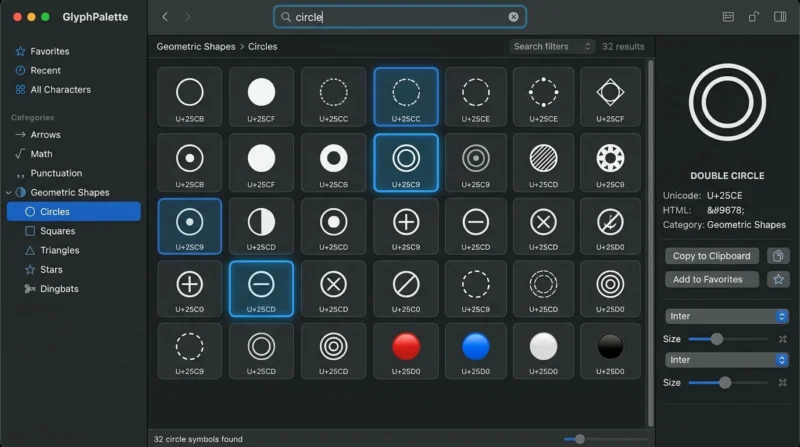
Apple macOS systems lack direct numeric ALT codes. Instead, users invoke the system-wide Character Viewer by pressing CTRL + CMD + SPACE. Navigating to the geometric shapes category or typing “circle” into the search field allows insertion of any desired variation into active text fields.
iOS and Android Emoji Panels
Mobile platforms handle circle symbol text via built-in virtual keyboards. On iOS and Android devices, switching to the symbol or numbers layout on the default keyboard reveals geometric shapes. Alternatively, copying a symbol from a web browser reference sheet allows pasting into mobile messaging apps and text editors.
Technical Overview of Circle UNICODE Characters
Web developers and document designers utilize standardized character sets to ensure universal rendering across browsers and operating systems. Geometric shapes reside within specific blocks of the UNICODE standard.
Code Point Reference Table
The UNICODE block covering geometric shapes spans from U+25A0 to U+25FF. Circle glyphs occupy distinct code points that maintain compatibility across legacy and modern fonts such as Arial, Segoe UI, and Times New Roman.
HTML Entities for Web Publishing
Web developers insert circle symbols into HTML documents using decimal or hexadecimal character references. The white circle utilizes ○ or ○, while the black circle uses ● or ●. These declarations prevent character encoding errors across different server configurations.
Frequently Asked Questions
How do I type a hollow circle symbol (○) on Windows?
Make sure NumLock is active, hold down the ALT key, type 9 on your numeric keypad, and release the ALT key.
What is the shortcut for a solid black circle (●) in Microsoft Word?
Type the UNICODE HEX value 25CF and immediately press ALT + X to convert it into the solid circle symbol.
How can I copy circle symbols without using shortcuts?
You can highlight any symbol variant from our quick-copy collection above, press CTRL + C (or CMD + C on Mac), and paste it directly into your text field.
Are circle text symbols supported across all devices and browsers?
Yes, standard UNICODE circle symbols like ○ and ● are universally supported across modern operating systems, web browsers, and mobile platforms.