


| System / Method | Shortcut or Code | Notes |
|---|---|---|
| Windows ALT Code | ALT + 42 | Use numeric keypad |
| Mac Shortcut | SHIFT + 8 | Direct key combination |
| Word Shortcut | 002A then ALT+X | Converts HEX to symbol |
| UNICODE | U+002A | Standard HEX code |
| HTML Entity | * | Web safe encoding |
Quick Answer: How to Type the Asterisk Symbol
The asterisk symbol (*) serves multiple functions across text editing, mathematics, programming, and data management. Knowing how to input this glyph quickly across different hardware layouts prevents workflow interruptions.
Standard QWERTY Shortcut
On a standard United States QWERTY keyboard layout, generate the asterisk by holding down the SHIFT key and pressing the number 8 key (SHIFT + 8). This matches the top-row punctuation mapping where the number 8 shares its keycap with the asterisk glyph.
Keypad and International Differences
Desktop keyboards featuring an independent numeric keypad often include a dedicated asterisk key positioned near the top right of the pad. International layouts vary significantly. For instance, French AZERTY boards require modifier keys or direct layout shifts because number row inputs default to lowercase characters unless SHIFT is active, and the physical asterisk placement shifts to a dedicated key near the enter section.
Typing the Asterisk on Windows and Mac
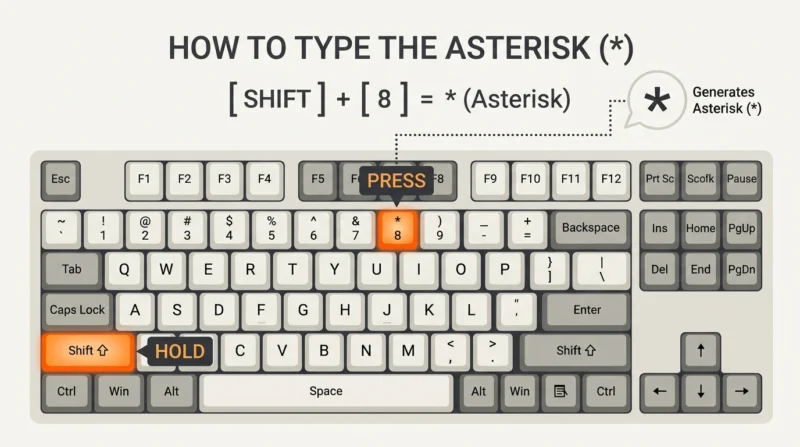
Different operating systems utilize unique shortcut pathways to render character glyphs when physical keycaps lack direct mappings.
Windows ALT Codes
Windows systems support numeric keypad sequences to inject characters directly via ASCII or UNICODE mapping tables. To generate an asterisk using this method, ensure Num Lock is active, press and hold the ALT key, type 42 on the numeric keypad, and release ALT. Standard keyboards lacking a dedicated ten-key pad require using the Windows On-Screen Keyboard utility or the Character Map application.
macOS Shortcuts
Apple Mac keyboards mirror standard U.S. configurations for this specific punctuation mark. Press SHIFT + 8 while using an Apple Magic Keyboard or MacBook internal layout to output the asterisk. Users working with foreign language input sources on macOS should reference the built-in Keyboard Viewer tool to locate modified key combinations.
Special Application Methods
Advanced document editors and productivity software provide alternative insertion routes for technical symbols.
Microsoft Word UNICODE Trick
Microsoft Word supports hexadecimal UNICODE conversion inside text environments. Type the exact hexadecimal code 002A directly into your document, then press the ALT and X keys simultaneously (ALT + X). The editor instantly transforms the raw alphanumeric sequence into the asterisk glyph.
Using Character Map
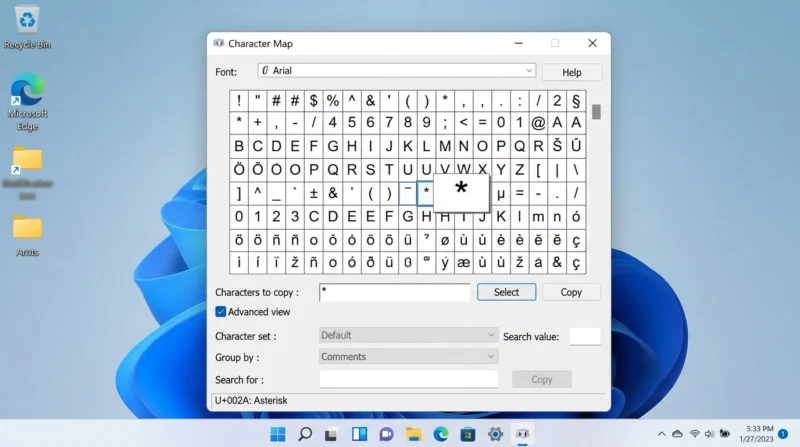
Windows users can launch the built-in Character Map utility via the system search bar. Search for asterisk or input UNICODE range 002A, highlight the character, click select, and copy the glyph into the clipboard for pasting into destination applications.
How to Type Asterisk on Mobile Devices
Virtual software keyboards on touchscreens require switching layout pages to access punctuation marks.
iOS and iPadOS
On an iPhone or iPad virtual keyboard, tap the symbol toggle key labeled ?123 in the bottom left corner of the interface. This reveals the primary punctuation and number grid where the asterisk (*) is clearly displayed.
Android Virtual Keyboards
Android devices using Gboard or stock OEM keyboards require tapping the ?125 or =\< key to access secondary symbol panels. Alternatively, long-pressing the number 8 key on select configurable Android layouts brings up a quick-selection popup containing the asterisk symbol.
Troubleshooting Keyboard Issues
Hardware malfunctions, sticky modifier switches, or incorrect language input settings can prevent standard shortcuts from registering properly.
Step-by-Step Driver and Hardware Checks
If pressing SHIFT + 8 produces an unexpected output such as an open parenthesis or numerical digit, verify your operating system’s active language and keyboard layout profile. An incorrect regional layout assignment swaps top-row punctuation mappings. Next, inspect the physical SHIFT and 8 key switches for debris or mechanical failure by testing input in a basic text editor or testing an external USB keyboard. Update keyboard device drivers via the Windows Device Manager if software conflicts prevent macro or modifier registration.
Frequently Asked Questions
How do I type the asterisk symbol on a standard keyboard?
On a standard U.S. QWERTY keyboard, press and hold the SHIFT key, then press the 8 key (SHIFT + 8).
What is the ALT code for the asterisk symbol on Windows?
The numeric keypad ALT code for the asterisk (*) is ALT + 42.
How do you insert an asterisk in Microsoft Word using UNICODE?
Type 002A in your document and immediately press ALT + X to convert the code into the asterisk symbol.
How do I type an asterisk on an iPhone or Android phone?
Tap the symbol toggle key (usually labeled ?123) on your mobile keyboard to access the punctuation layout containing the asterisk.