
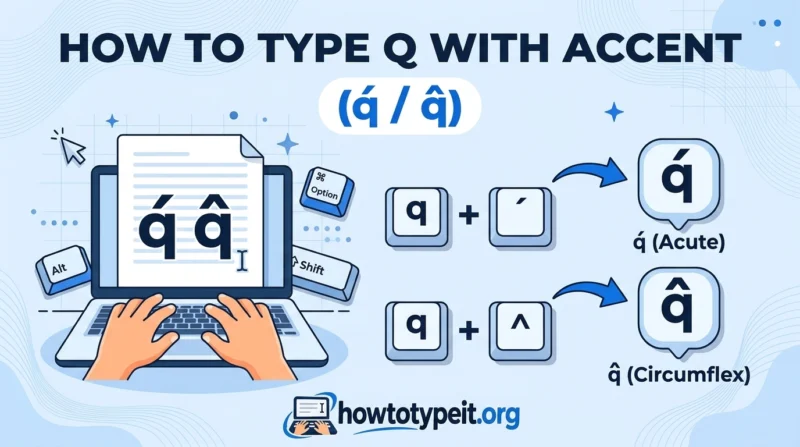

| System / Method | Shortcut or Code | Notes |
|---|---|---|
| Windows ALT Code | ALT + [Code] | No direct single ALT code; use UNICODE HEX composition |
| Mac Shortcut | Option + [Key] | Requires combining diacritical sequence |
| Word Shortcut | 0301 then ALT+X | Applies combining acute after typing base letter q |
| UNICODE | U+0071 U+0301 | Base letter q plus combining acute accent |
| HTML Entity | q́ / q́ |
Numeric reference for web documents |
Quick Copy and Paste
Accented variants of the letter Q appear in specific linguistic contexts, such as the Chimane grapheme or specialized phonetic transcriptions. Because standard physical keyboards lack a dedicated single-key output for an accented Q, selecting and copying pre-composed UNICODE strings remains the most reliable method for word processors and web publishing platforms.
Lowercase Accented Q
Use these variations for lowercase requirements:
- Acute Accent: q́ (Base q + Combining Acute U+0301)
- Circumflex Accent: q̂ (Base q + Combining Circumflex U+0302)
UNICODE and Character Codes

The UNICODE standard builds accented characters through base glyphs followed immediately by combining diacritical marks. This structure lets rendering engines stack accents correctly above the glyph.
Uppercase Accented Q
Use these variations for capitalized titles or sentence beginnings:
- Acute Accent: Q́ (Base Q + Combining Acute U+0301)
- Circumflex Accent: Q̂ (Base Q + Combining Circumflex U+0302)
Acute Accent Form
The acute variant combines the standard ASCII letter with the combining acute mark.
- Lowercase HEX:
U+0071+U+0301(q́) - Uppercase HEX:
U+0051+U+0301(Q́) - Lowercase Decimal:
113+769 - Uppercase Decimal:
81+769
Circumflex Accent Form
The circumflex variant applies a rooftop accent over the letter Q.
- Lowercase HEX:
U+0071+U+0302(q̂) - Uppercase HEX:
U+0051+U+0302(Q̂) - Lowercase Decimal:
113+770 - Uppercase Decimal:
81+770
How to Type Q with Accent on Major Platforms
Typing combining characters requires specific software sequences since operating systems do not assign single-key shortcuts to rare glyph combinations.
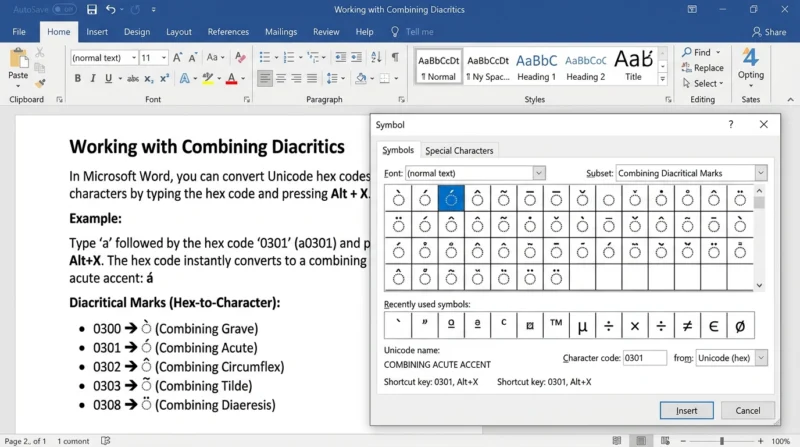
Typing in Microsoft Word
Microsoft Word handles combining diacritics via hexadecimal UNICODE expansion. To insert a lowercase q with an acute accent:
- Type the letter q.
- Type the HEX code for the acute accent: 0301.
- Press ALT + X immediately after the code to convert the HEX digits into the combining diacritical mark positioned above the letter.
For the circumflex accent, follow the same steps using 0302 instead of 0301.
Using HTML Entities for Web Development
Standard named entities do not exist for accented Q characters in HTML. Web developers must use numeric entity references combining the base character code and the combining mark reference.
- Acute Lowercode:
q́or HEX notationq́ - Acute Uppercase:
Q́or HEX notationQ́ - Circumflex Lowercase:
q̂or HEX notationq̂ - Circumflex Uppercase:
Q̂or HEX notationQ̂
Frequently Asked Questions
How do I type q with an acute accent (q́)?
You can type q́ by combining the base letter q with the combining acute accent (UNICODE U+0301), or by copying and pasting the pre-composed character from reference tables.
What is the UNICODE value for q with a circumflex (q̂)?
The lowercase q with a circumflex (q̂) consists of the base letter q (U+0071) followed immediately by the combining circumflex accent (U+0302).
Are there standard ALT codes for q with an accent?
There are no standard single-keystroke Windows ALT codes for accented q variants, making UNICODE sequence composition or copy-pasting the most reliable methods.
How do I write q with an accent in HTML?
You can use numeric character references in HTML, such as q́ for the acute form or q̂ for the circumflex form.