

| System / Method | Shortcut or Code | Notes |
|---|---|---|
| Windows ALT Code | ALT + 228 (Uppercase) / ALT + 229 (Lowercase) | Use numeric keypad |
| Mac Shortcut | Option + W | Produces uppercase Σ |
| Word Shortcut | 03A3 then ALT + X | Converts HEX to UNICODE symbol |
| UNICODE | U+03A3 (Uppercase) / U+03C3 (Lowercase) | Standard HEX code |
| HTML Entity | Σ (Uppercase) / σ (Lowercase) | Web safe codes |
Quick Copy and Paste Sigma Symbols
Use the individual copy blocks below for immediate placement of the Greek sigma variations into documents, spreadsheets, or web forms.
Uppercase Sigma
Symbol: Σ | UNICODE: U+03A3 | Decimal: 931
Used primarily as the summation operator in mathematics and engineering.
Lowercase Sigma
Symbol: σ | UNICODE: U+03C3 | Decimal: 963
Used in statistics to denote standard deviation and in mechanics for normal stress.
Final Sigma
Symbol: ς | UNICODE: U+03C2 | Decimal: 962
Used in the Greek alphabet exclusively at the end of a word.
How to Type Sigma on Windows
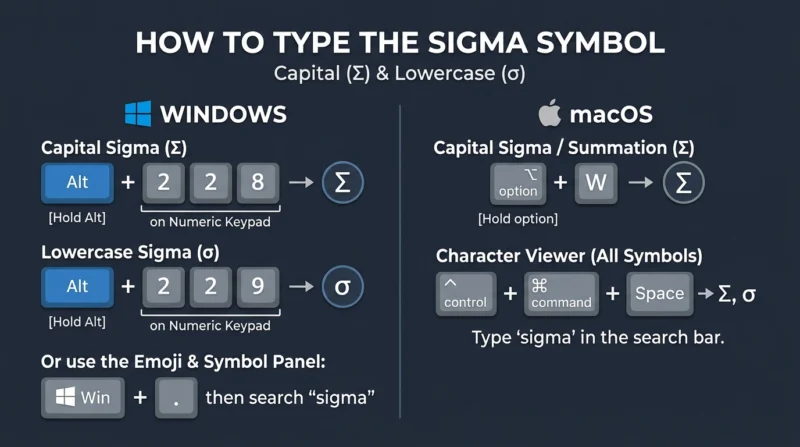
Windows operating systems provide multiple pathways for inserting Greek characters depending on software environment and keyboard hardware.
Using Numeric Keypad ALT Codes
Ensure NumLock is active. Press and hold the ALT key while typing the numbers on the dedicated numeric keypad.
- Uppercase Sigma (Σ): Hold ALT and type 228.
- Lowercase Sigma (σ): Hold ALT and type 229.
Using UNICODE HEX and ALT + X in Word
Microsoft Word supports native hexadecimal code conversion. Type the HEX identifier directly into your document, then press ALT + X.
- For uppercase Σ: Type 03A3 then press ALT + X.
- For lowercase σ: Type 03C3 then press ALT + X.
- For final ς: Type 03C2 then press ALT + X.
How to Type Sigma on Mac
macOS streamlines Greek character input through standard key combinations and system palettes.
Using Keyboard Shortcuts
On a standard U.S. Apple keyboard layout, press Option + W to generate the uppercase sigma symbol (Σ).
Using the Character Viewer
To access lowercase and final sigma variants on macOS:
- Press Control + Command + Space to open the Character Viewer.
- Type sigma into the search bar.
- Double-click the desired variation (Σ, σ, or ς) to insert it into the active text field.
Sigma in Microsoft Office and Excel
Spreadsheet applications and document editors offer specialized interfaces for mathematical symbols.
AutoSum in Excel
In Microsoft Excel, the uppercase sigma functions as the AutoSum button. Press ALT + = to automatically insert the summation formula into a selected cell.
The Symbol Dialog Box
When keyboard shortcuts fail:
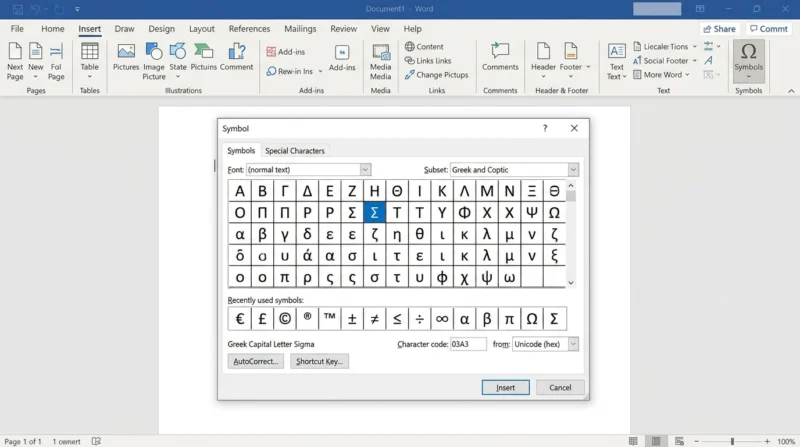
- Navigate to the Insert tab on the ribbon.
- Click Symbol and select More Symbols.
- Set the font to (normal text) and the subset dropdown to Greek and Coptic.
- Select the sigma character and click Insert.
Alternatively, use the quick navigation shortcut ALT + N + U to open the symbol menu directly.
HTML Entities and LATEX Coding
Web developers and researchers require specific markup strings to render sigma symbols correctly across browsers and typesetting engines.
Web Design Entities
Use standard HTML named entities or decimal references within web code:
- Uppercase Sigma:
ΣorΣ - Lowercase Sigma:
σorσ - Final Sigma:
ςorς
Mathematical LATEX Syntax
In academic papers, markdown renderers, and LATEX editors:
- Uppercase Sigma:
Sigmarenders as $Sigma$. - Lowercase Sigma:
sigmarenders as $sigma$.
Frequently Asked Questions
What is the ALT code for the uppercase sigma symbol?
The primary ALT code for uppercase sigma (Σ) is ALT + 228 when using Microsoft Word or Excel with an active numeric keypad.
How do you type sigma in Microsoft Word quickly?
Type the UNICODE HEX code 03A3 for uppercase or 03C3 for lowercase, then immediately press ALT + X to convert the code.
What does the lowercase sigma symbol mean?
In statistics and mathematics, the lowercase sigma (σ) typically represents standard deviation, while uppercase (Σ) denotes summation.
How do you type sigma on a Mac keyboard?
On a standard U.S. Mac layout, pressing Option + W produces the uppercase sigma symbol (Σ).