


| System / Method | Shortcut or Code | Notes |
|---|---|---|
| Windows ALT Code | ALT + 227 | Requires numeric keypad with NUMLOCK active |
| Mac Shortcut | OPTION + P | Works in all native text fields |
| Word UNICODE HEX | 03C0 then ALT + X | Converts HEX code to symbol instantly |
| Linux UNICODE | CTRL + SHIFT + U, then 03c0 | Press ENTER or SPACE to finish |
| HTML Entity | π or π | Web development standard |
Quick Methods to Type the Pi Symbol
Typing the lowercase Greek letter pi (π) requires platform-specific commands depending on whether you operate a Windows PC, Apple Mac, or Linux workstation. The symbol represents the mathematical ratio of a circle’s circumference to its diameter and appears frequently in geometry, trigonometry, and engineering documents.
Windows Shortcut
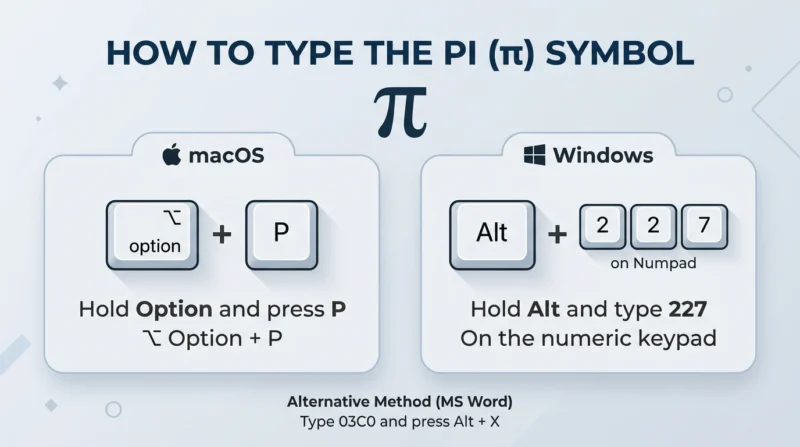
Windows users rely on the physical numeric keypad to generate mathematical symbols. Verify that your NUMLOCK key is turned on. Press and hold the ALT key, then type 2, 2, and 7 on the numeric keypad. Release the ALT key to render π. Alternatively, use ALT + 960. For uppercase Pi (Π), use ALT + 928. Note that the standard number row across the top of a keyboard will not register these ALT codes.
Mac Shortcut
Apple macOS systems offer a direct keyboard shortcut without needing a numeric keypad. Press OPTION + P to insert the lowercase pi symbol (π) immediately. To produce the uppercase Pi symbol (Π), press OPTION + SHIFT + P. These shortcuts function across all native text editors, browsers, and messaging applications.
Linux Shortcut
Linux distributions utilize universal UNICODE input modes. Press CTRL + SHIFT + U simultaneously. An underlined letter u will appear on your cursor. Type 0, 3, c, 0 and press ENTER or SPACE to output the pi symbol.
How to Type Pi in Microsoft Word and Google Docs
Word processing applications provide specialized tools for embedding mathematical characters without memorizing hardware numeric codes.
UNICODE ALT-X Shortcut in Word
Microsoft Word for Windows accepts direct UNICODE conversion. Type the HEX code 03C0 directly into your document, then press ALT + X. The four characters will instantly transform into the pi symbol (π). If you need the formula editor, press ALT + = to insert an equation block, type pi, and press SPACE.
Special Characters Menu in Google Docs
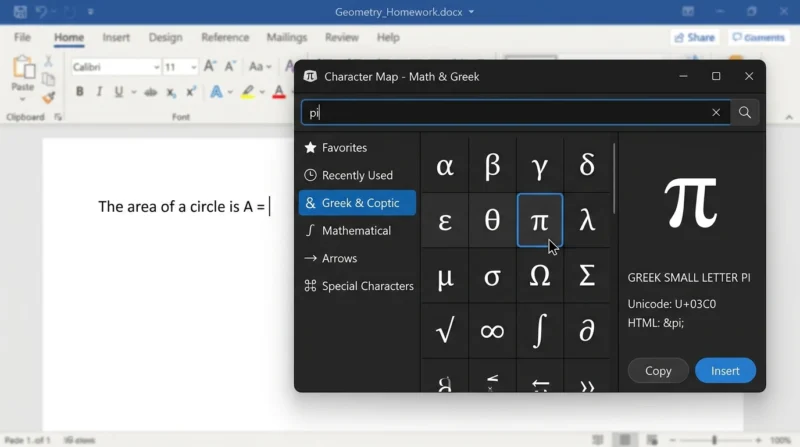
Google Docs lacks a native single-key shortcut for pi on standard US keyboard layouts. Access the menu bar by navigating to Insert, selecting Special characters, and typing pi into the search bar. Click the resulting π symbol to insert it into your active document. You can also draw the symbol in the provided sketch pad.
HTML Entities and UNICODE Values
Web developers and technical writers must frequently code mathematical symbols into markup languages for proper browser rendering across devices.
Web Development Entities
When writing HTML code, use named or numeric entities to ensure universal character display. The named entity is π. The decimal numeric entity is π, and the hexadecimal entity is π.
UNICODE HEX Codes
The formal UNICODE designation for lowercase pi is U+03C0. Uppercase capital Pi is designated as U+03A0. These identifiers remain consistent across programming environments, database collations, and font families.
Frequently Asked Questions
What is the ALT code for the pi symbol?
The ALT code for lowercase pi (π) is ALT + 227 when using the numeric keypad with NumLock enabled. You can also use ALT + 960.
How do I type pi on a Mac keyboard?
Press Option + P to instantly insert the lowercase pi symbol (π) on any Mac application.
How do you type pi in Microsoft Word?
Type 03C0 and press ALT + X on your keyboard to convert the text directly into the pi symbol.
What is the UNICODE value for the pi symbol?
The UNICODE code point for lowercase pi is U+03C0, and its decimal value is 960.