


Quick Reference Guide for Spanish Accents
Typing accented Spanish characters requires familiarity with specific character codes and keyboard layouts. Below is the complete encoding matrix covering lowercase and uppercase variants, Windows NUMPAD ALT codes, macOS dead keys, and UNICODE HEX values.
| Glyph | Name | UNICODE HEX | HTML Entity | Windows ALT Code | Mac Shortcut |
|---|---|---|---|---|---|
| á | a acute | U+00E1 | á |
ALT + 0225 | OPTION + E, then A |
| é | e acute | U+00E9 | é |
ALT + 0233 | OPTION + E, then E |
| í | i acute | U+00ED | í |
ALT + 0237 | OPTION + E, then I |
| ó | o acute | U+00F3 | ó |
ALT + 0243 | OPTION + E, then O |
| ú | u acute | U+00FA | ú |
ALT + 0250 | OPTION + E, then U |
| ü | u diaeresis | U+00FC | ü |
ALT + 0252 | OPTION + U, then U |
| ñ | n tilde | U+00F1 | ñ |
ALT + 0241 | OPTION + N, then N |
| Á | A acute | U+00C1 | Á |
ALT + 0193 | OPTION + E, then SHIFT + A |
| É | E acute | U+00C9 | É |
ALT + 0201 | OPTION + E, then SHIFT + E |
| Í | I acute | U+00CD | Í |
ALT + 0205 | OPTION + E, then SHIFT + I |
| Ó | O acute | U+00D3 | Ó |
ALT + 0211 | OPTION + E, then SHIFT + O |
| Ú | U acute | U+00DA | Ú |
ALT + 0218 | OPTION + E, then SHIFT + U |
| Ü | U diaeresis | U+00DC | Ü |
ALT + 0220 | OPTION + U, then SHIFT + U |
| Ñ | N tilde | U+00D1 | Ñ |
ALT + 0209 | OPTION + N, then SHIFT + N |
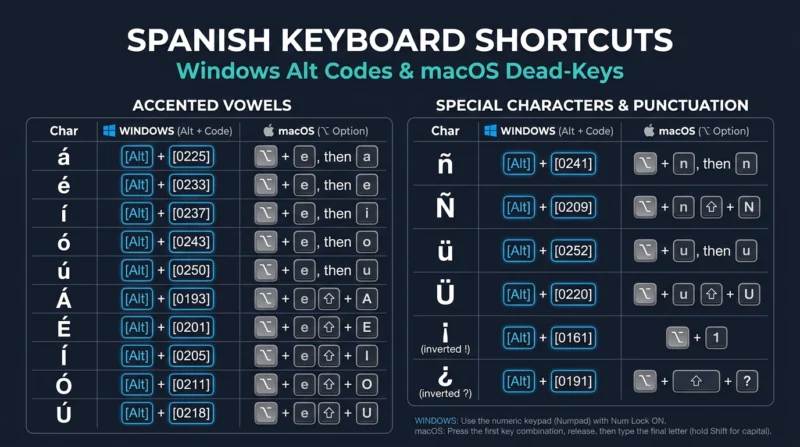
The Core Spanish Accent Set
Spanish orthography relies on acute accents (á, é, í, ó, ú) to indicate word stress exceptions, differentiate homophones, and mark interrogative pronouns. The tilde on the letter ñ creates a distinct nasal palatal consonant sound, while the diaeresis on ü forces the pronunciation of the letter u in combinations like “güe” and “güi”.
Uppercase and Lowercase Mapping
Typing uppercase accented letters is frequently required at the start of sentences or in formal titles. Every lowercase accented glyph features a distinct uppercase equivalent that maintains strict UNICODE rules. Neglecting uppercase accents can alter legal or professional document accuracy.
How to Type Spanish Accents on Windows
Windows operating systems offer multiple input paths for generating Spanish accents depending on software environment and keyboard hardware.
Using NUMPAD ALT Codes
To use numerical ALT codes on Windows, ensure that NUM LOCK is active. Press and hold the ALT key, then type the exact four-digit numerical sequence on the physical NUMPAD (not the top row number keys). Release the ALT key to render the character. For example, holding ALT and pressing 0225 outputs á.
Microsoft Word UNICODE Shortcuts
Microsoft Word for Windows supports native hexadecimal UNICODE conversion. Type the four-character UNICODE HEX value directly into your document (for example, type 00E1 for á), and immediately press ALT + X. Word will instantly convert the alphanumeric string into the target accented character.
How to Type Spanish Accents on Mac
macOS utilizes a system of dead keys that modify the subsequent keystroke to produce accented characters.
Using Option Key Combinations
To place an acute accent over any vowel, press and release OPTION + E simultaneously. The screen will display a temporary accent mark waiting for a vowel. Press the target letter key (such as A, E, I, O, or U) to generate the finished accented vowel. For capital accented letters, hold SHIFT along with the vowel key.
Typing the Tilde and Diaeresis
To generate the tilde character on a Mac, press OPTION + N, release, and then press N again to output ñ. For the diaeresis over the letter u, press OPTION + U, release, and then press U to produce ü.
Typing Spanish Letters on Mobile Devices
Mobile touch keyboards simplify foreign character input through contextual gesture controls.
iOS and Android Long-Press Menus
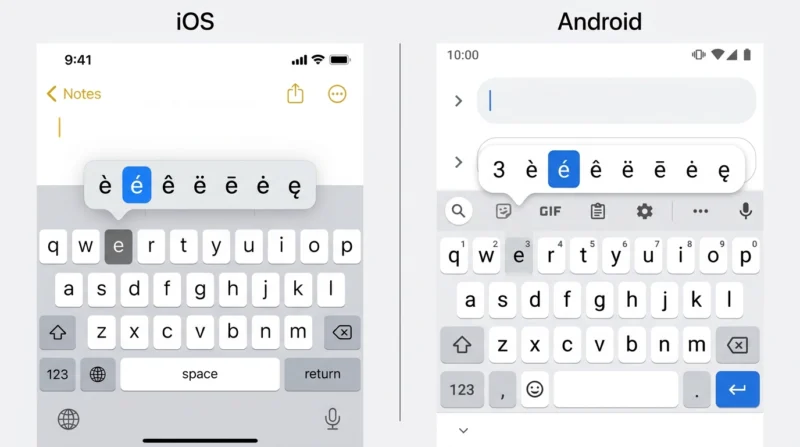
On both iOS and Android default virtual keyboards, tap and hold your finger on the base letter key (such as A, E, I, O, U, or N). A small floating menu will appear above your finger displaying all available diacritics and accented variations. Slide your finger to select the desired character and release.
Frequently Asked Questions
How do I type accented Spanish letters on a standard Windows PC?
You can type accented Spanish letters on Windows by holding down the ALT key and typing a 4-digit code on your physical numeric keypad (for example, ALT + 0225 for á).
What is the easiest way to type Spanish accents on a Mac?
On a Mac, use dead-key shortcuts like OPTION + E followed by a vowel to generate an acute accent, or OPTION + N followed by N to generate ñ.
How do I type an accent mark in Microsoft Word?
In Microsoft Word for Windows, you can type the UNICODE HEX value (like 00E1 for á) and immediately press ALT + X to convert the text.
How do I get Spanish accent marks on my iPhone or Android phone?
On mobile devices, simply tap and hold down the base letter key (such as A, E, or N) until a popup menu displays the available accented variants.
Recommended Reading: How to Type Spanish Letters with Accent Marks
Authority Source: Spanish Accent Marks | SpanishDictionary.com