


|—|—|—|
| Windows ALT Code | ALT + 236 | Use numeric keypad with Num Lock active |
| Mac Shortcut | Option + 5 | Direct key combination on US layout |
| Word HEX Shortcut | 221E + ALT + X | Instant conversion in Microsoft Word |
| UNICODE | U+221E | Standard character mapping |
| HTML Entity | ∞ or ∞ | Web development markup |
Quick Methods to Insert the Infinity Symbol
Copy and Paste Directly
When speed is your primary objective, copying the glyph directly from a quick reference box remains the fastest approach. Highlight the symbol ∞, copy it to your system clipboard, and paste it directly into your target document, email client, or web form.
At a Glance Shortcut Guide
Different operating systems handle special character insertion through dedicated system calls. Hardware configurations dictate whether you rely on numeric keypads, modifier key combinations, or HEX-to-text conversion utilities. Keep your target application environment in mind before selecting a keystroke method.
Typing Infinity on Windows Operating Systems
Using Numeric Keypad ALT Codes

Windows systems support direct character input through ASCII and UNICODE decimal mappings executed via the physical numeric keypad.
- Ensure your physical keyboard has Num Lock engaged.
- Press and hold the ALT key.
- Type 2, 3, 6 sequentially on your numeric keypad.
- Release the ALT key to render the ∞ character.
Alternatively, the extended decimal sequence ALT + 8734 outputs the exact same character point across standard Windows text editors.
Using the Built-In Emoji and Symbol Panel
Modern Windows environments include a native system emoji and character picker. Press WIN + . or WIN + ; to open the floating input window. Navigate to the symbols category or type “infinity” into the search query box to select and insert the glyph into any active text field.
Typing Infinity on Apple macOS
The Option Key Shortcut
Apple hardware running macOS simplifies mathematical and special character input through the Option modifier key. On a standard US layout keyboard, press Option + 5 simultaneously to insert the infinity symbol instantly.
Using the Character Viewer
For users operating alternative keyboard layouts where modifier shortcuts differ, the macOS Character Viewer provides visual access. Press Control + Command + Space to open the character palette, search for “infinity,” and double-click the glyph to insert it.
Advanced Entry in Microsoft Word and Applications
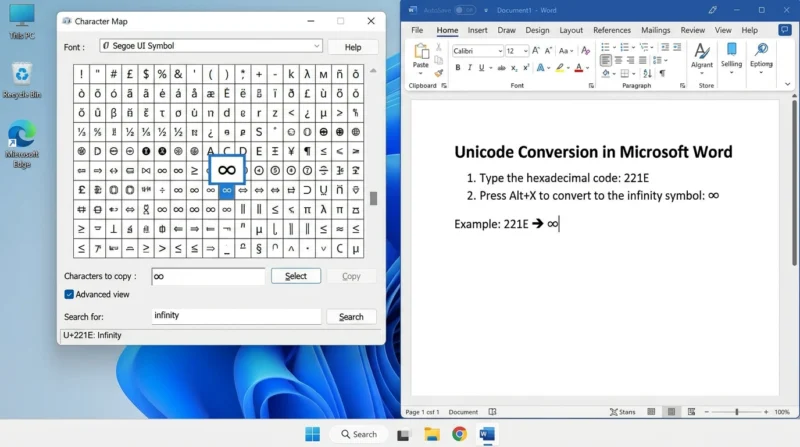
The UNICODE ALT + X HEX Conversion
Microsoft Word, Outlook, and other rich text applications within the Office suite support hexadecimal UNICODE expansion. Type the universal HEX code 221E directly into your document, then immediately press ALT + X. The application converts the raw code string into the target ∞ character.
Linux and IBus Compose Methods
Linux environments utilizing IBus or standard GNOME desktop shells rely on UNICODE HEX entry. Press CTRL + SHIFT + U, release the keys, type 221E, and press Enter to commit the symbol to the text stream.
Frequently Asked Questions
How do I type the infinity symbol on a Windows keyboard?
Turn on Num Lock, press and hold the ALT key, type 236 on your numeric keypad, and release ALT.
What is the Mac shortcut for the infinity symbol?
Press Option + 5 on a standard US Mac keyboard layout to instantly insert the infinity symbol.
How do you type infinity in Microsoft Word?
Type the UNICODE hexadecimal code 221E and immediately press ALT + X to convert it into ∞.
What is the UNICODE code point for the infinity symbol?
The standard UNICODE code point for the infinity symbol is U+221E with a decimal value of 8734.