

Quick Reference I Symbols Chart
Accented Latin I characters appear across multiple Romance languages, scientific notations, and phonetic alphabets. The following reference matrix displays exact character names, UNICODE HEX encodings, HTML entities, and platform input combinations.
| Glyph | Name | UNICODE | HTML Entity | Windows ALT Code | Mac Shortcut |
|---|---|---|---|---|---|
| ì | i with grave | U+00EC | ì | ALT + 0236 | OPT + |
| í | i with acute | U+00ED | í | ALT + 0237 | OPT + E, then I |
| î | i with circumflex | U+00EE | î | ALT + 0238 | OPT + I, then I |
| ï | i with diaeresis | U+00EF | ï | ALT + 0239 | OPT + U, then I |
| ĩ | i with tilde | U+0129 | ĩ | None (Use UNICODE / Copy) | None (Use Character Viewer) |
| ī | i with macron | U+012B | ī | None (Use UNICODE / Copy) | None (Use Character Viewer) |
| Ì | I with grave | U+00CC | Ì | ALT + 0204 | OPT + , then SHIFT + I |
| Í | I with acute | U+00CD | Í | ALT + 0205 | OPT + E, then SHIFT + I |
| Î | I with circumflex | U+00CE | Î | ALT + 0206 | OPT + I, then SHIFT + I |
| Ï | I with diaeresis | U+00CF | Ï | ALT + 0207 | OPT + U, then SHIFT + I |
| Ĩ | I with tilde | U+0128 | Ĩ | None (Use UNICODE / Copy) | None (Use Character Viewer) |
| Ī | I with macron | U+012A | Ī | None (Use UNICODE / Copy) | None (Use Character Viewer) |
How to Type I Symbols on Windows
Windows operating systems offer multiple pathways for inserting specialized typographic glyphs. Choosing the correct approach depends on whether your keyboard features a physical numeric keypad.
Using Numeric Keypad ALT Codes
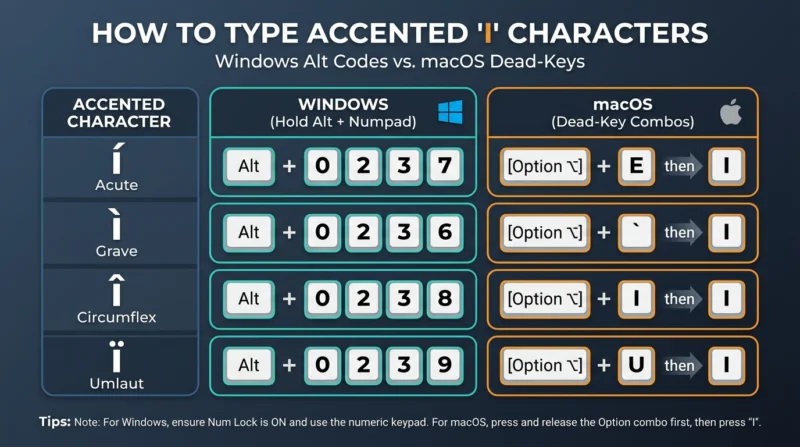
To output accented characters directly into any text field, ensure NUMLOCK is active. Press and hold the ALT key, type the exact decimal sequence on your dedicated numeric pad, and release ALT. For example, holding ALT while typing 0237 generates í. Standard top-row number keys will not register for legacy ANSI code entry.
Using Character Map and UNICODE
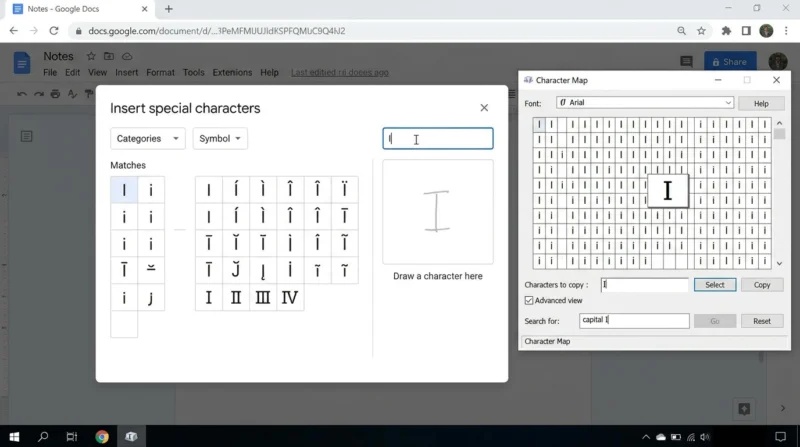
For symbols lacking standard four-digit ALT codes (such as ĩ or ī), launch the built-in Windows Character Map application by pressing WIN + R, typing charmap, and pressing ENTER. Search for the target letter, select it, copy it to your clipboard, and paste it into your document.
How to Type I Symbols on Mac
macOS utilizes intuitive dead-key combinations and on-screen selection menus for generating accented typography without navigating external utility apps.
Using Option Dead Keys
Mac keyboards rely on modifier sequences where the first combination primes the text engine for an accent mark. To type ì, press OPT + ` (backtick), release the keys, and then press I. For acute accents (í), press OPT + E before tapping I. For circumflex (î), use OPT + I, and for diaeresis (ï), use OPT + U followed by I.
The Press-and-Hold Menu Method
Hold down the I key on any standard macOS text field for one second. A numbered floating popup menu appears above the cursor displaying all available letter variants. Press the corresponding number key on your keyboard or click the desired glyph with your mouse to insert it.
Inserting I Symbols in Microsoft Word and Google Docs
Word processing suites streamline foreign character input through built-in macros and specialized menus.
Microsoft Word Shortcuts
Microsoft Word supports direct UNICODE HEX-to-character conversion. Type the exact hexadecimal code (such as 00ED for í), immediately followed by holding ALT and pressing X. The editor instantly converts the raw hexadecimal text into the formatted glyph.
Google Docs Special Characters
Google Docs bypasses complex keyboard memory requirements via its native insertion menu. Navigate to the top menu bar, click Insert, select Special characters, and type “i” or the specific accent name into the search box to select your target symbol.
Typing I Symbols on Mobile Devices
Virtual software keyboards on modern smartphones and tablets handle diacritics natively through touch gestures.
iOS and iPadOS Touch-and-Hold
On iPhones and iPads, tap and hold the virtual I key on the default software keyboard. A selection drawer pops up showing every variation of the letter. Slide your finger over your chosen accent mark and lift your finger to insert it.
Android Virtual Keyboards
Android devices running Gboard or manufacturer keyboards utilize the exact same mechanism. Long-press the I key to trigger the diacritic selection panel, then slide across to output characters like ï, í, or î.
Frequently Asked Questions
How do I type the lowercase i with an acute accent (í) on Windows?
You can type the í character on Windows by holding down the ALT key and typing 0237 on your numeric keypad.
What is the Mac keyboard shortcut for i with a grave accent (ì)?
Press OPT + ` (backtick), release both keys, and then press the I key.
How do I get accented I symbols on an iPhone or Android phone?
Simply touch and hold the I key on your mobile software keyboard until a popup menu appears, then slide your finger to choose your desired variant.
Can I copy and paste I symbols directly from this page?
Yes, you can highlight any of the accented characters (such as ì, í, î, ï, ĩ, ī) from our reference charts and paste them directly into your document or application.